

.png?width=120&height=55&name=Blitzz-Logo-right%20white%20eyes%20-%20not%20transparent%20(3).png)

Visual Remote Assist for Microsoft Dynamics 365
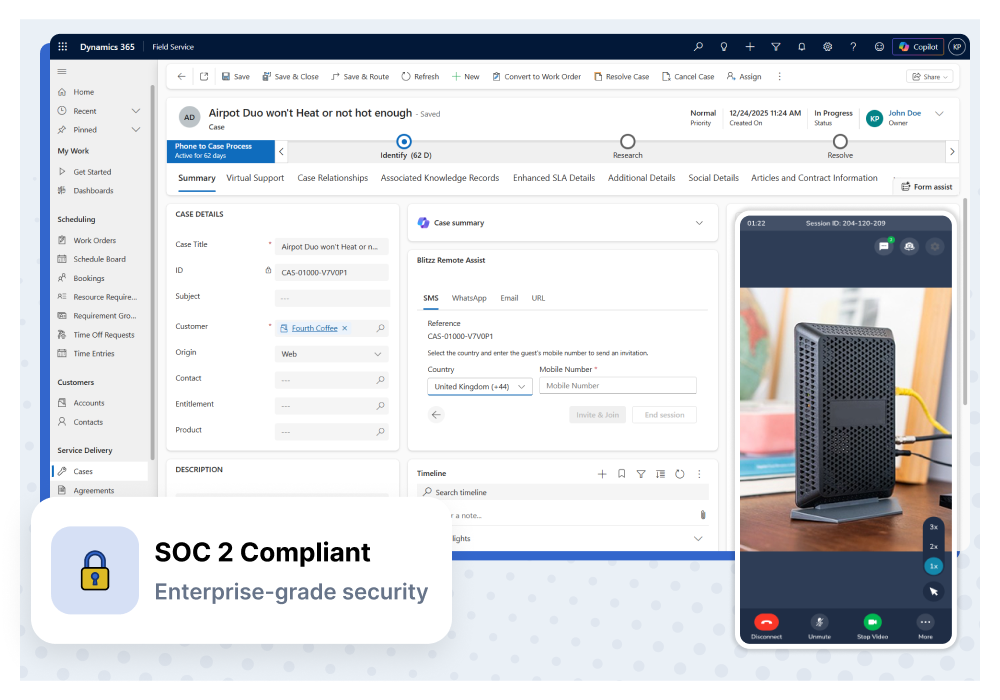
Launch video support, cobrowse, and screen sharing sessions directly from Dynamics 365 Customer Service, Field Service, or Sales. See what your customers see and resolve issues faster, no app download required.
Trusted by Leading Companies





How It Works
See Blitzz in Action Inside Dynamics 365
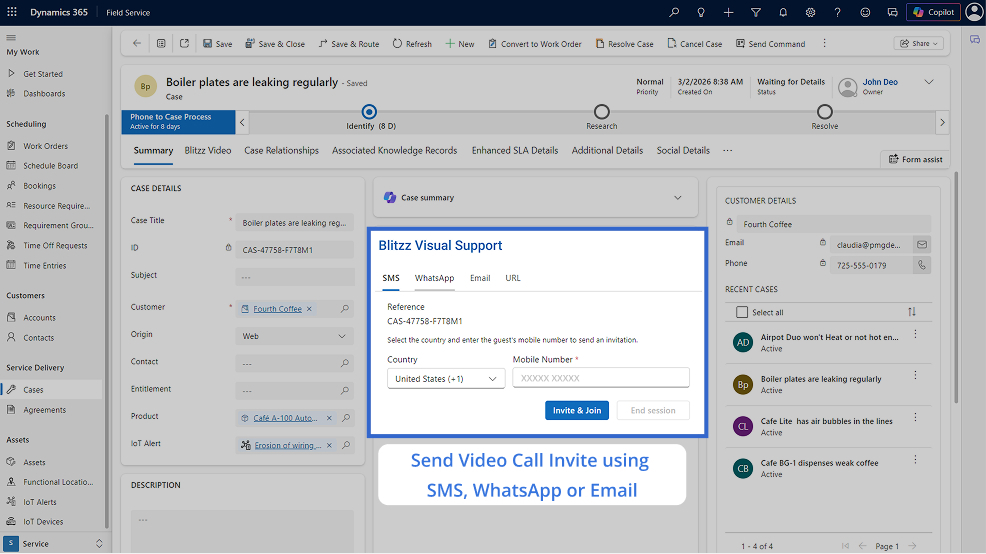
Invite Customers Instantly via SMS, WhatsApp, or Email
Start sessions directly from case records in Dynamics 365
Multiple invite channels — SMS, WhatsApp, and Email
Customers connect instantly via browser, no downloads needed
Session data syncs automatically to your Dynamics 365 records
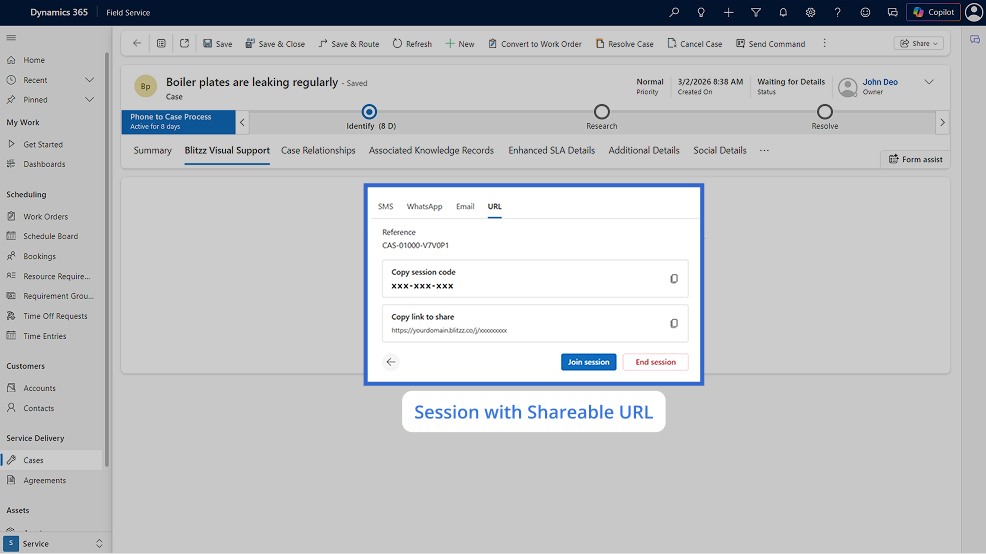
Share Sessions with a URL or Session Code
Generate a unique shareable URL for each session
Easy-to-use session codes for quick customer access
Works across all devices and browsers
Copy and share through any communication channel you prefer
Why Blitzz for Dynamics 365
Resolve Issues Faster Without
Leaving Dynamics 365
One-Click Session Launch
Start video calls directly from any Dynamics 365 case, work order, contact, or account record with a single click.
Automatic Data Sync
Recordings, images, and session notes sync to your Dynamics 365 records automatically for complete documentation.
No App for Customers
Customers connect via browser link. No downloads, no friction, achieving 95%+ connection success rates.
Enterprise Security
SOC 2 compliant with end-to-end encryption and SSO/SAML support. Seamless integration with Azure Active Directory.
Use Cases
How Teams Use Blitzz with Dynamics 365
Remote Customer Support
Enable contact center agents to see customer issues through live video. Troubleshoot equipment, guide product setup, and resolve technical problems without dispatching technicians.
Remote Field Service
Connect field technicians with remote experts for real-time guidance on complex repairs. Reduce escalations and improve first-time fix rates with visual collaboration.
Remote Video Inspections
Conduct property inspections, equipment audits, and compliance checks remotely. Capture timestamped photos with GPS data for complete documentation in Dynamics 365.
Video-Powered Sales
Give sales teams visual selling capabilities. Demo products remotely, conduct virtual walkthroughs, and build stronger customer relationships with face-to-face interactions.
Insurance Claims
Process claims faster with remote video documentation. Adjusters can assess damage, capture evidence, and complete FNOL remotely while documenting everything in Dynamics 365.
Customer Onboarding
Use OCR to capture serial numbers, VINs, meter readings, and product labels during video calls. Eliminate manual data entry and reduce errors in your Dynamics 365 records.
Frequently Asked Questions
Have Question? We are here to help
How long does it take to set up Blitzz with Dynamics 365?
Setup takes just minutes. After installing the Blitzz integration, you configure it with your Blitzz API key and add the Blitzz widget to your Dynamics 365 forms and dashboards. The integration works with both the Unified Interface and custom model-driven apps. Most teams are up and running the same day with full video support capabilities.
Which Dynamics 365 modules does Blitzz integrate with?
Blitzz integrates with Dynamics 365 Customer Service, Field Service, Sales, and custom model-driven apps. You can launch sessions from Cases, Work Orders, Contacts, Accounts, and custom entities. The integration also supports the Dynamics 365 Customer Service workspace and Omnichannel for Customer Service.
Do customers need to download an app to connect?
No. Blitzz is completely browser-based. Agents send a secure link via SMS, email, or WhatsApp, and customers click to connect instantly from any smartphone browser on iOS or Android. No app store visits or downloads required, achieving 95%+ connection success rates.
What data syncs between Blitzz and Dynamics 365?
Blitzz automatically syncs session metadata, call recordings, captured images, annotations, GPS location data, and AI-generated call summaries to your Dynamics 365 records. You can configure which entities receive session data and customize field mappings in Dataverse to meet your organization's reporting needs.
Does Blitzz work with Azure Active Directory (Entra ID)?
Yes. Blitzz supports SSO through Azure Active Directory (Microsoft Entra ID), enabling seamless single sign-on for your agents. This means your team can access Blitzz using their existing Microsoft credentials without managing separate logins, while IT maintains centralized access control.
How much does Blitzz for Dynamics 365 cost?
Blitzz for Dynamics 365 is offered on a per-user, per-month basis and includes all enterprise features such as cobrowse, screen sharing, video chat, HD photo capture, markups, call recording, AI call summaries, white labeling, and unlimited sessions. Please get in touch with us to discuss pricing and volume discounts for larger deployments.
Can I try Blitzz before purchasing?
Absolutely. You can request a free demo to see Blitzz in action within Dynamics 365, or try the integration in a sandbox environment. We also offer a pilot program where you can test Blitzz with your team for 30 days to measure ROI before committing.