

.png?width=120&height=55&name=Blitzz-Logo-right%20white%20eyes%20-%20not%20transparent%20(3).png)
AI agent assist for remote visual support.
It sees. It reasons. It resolves.
Owlbert AI analyzes live video and shared screens, identifies equipment and issues, and surfaces answers from your knowledge base in real time. Then it writes the notes and the report.
- Works in every product
- Answers from your content
- Syncs to your CRM
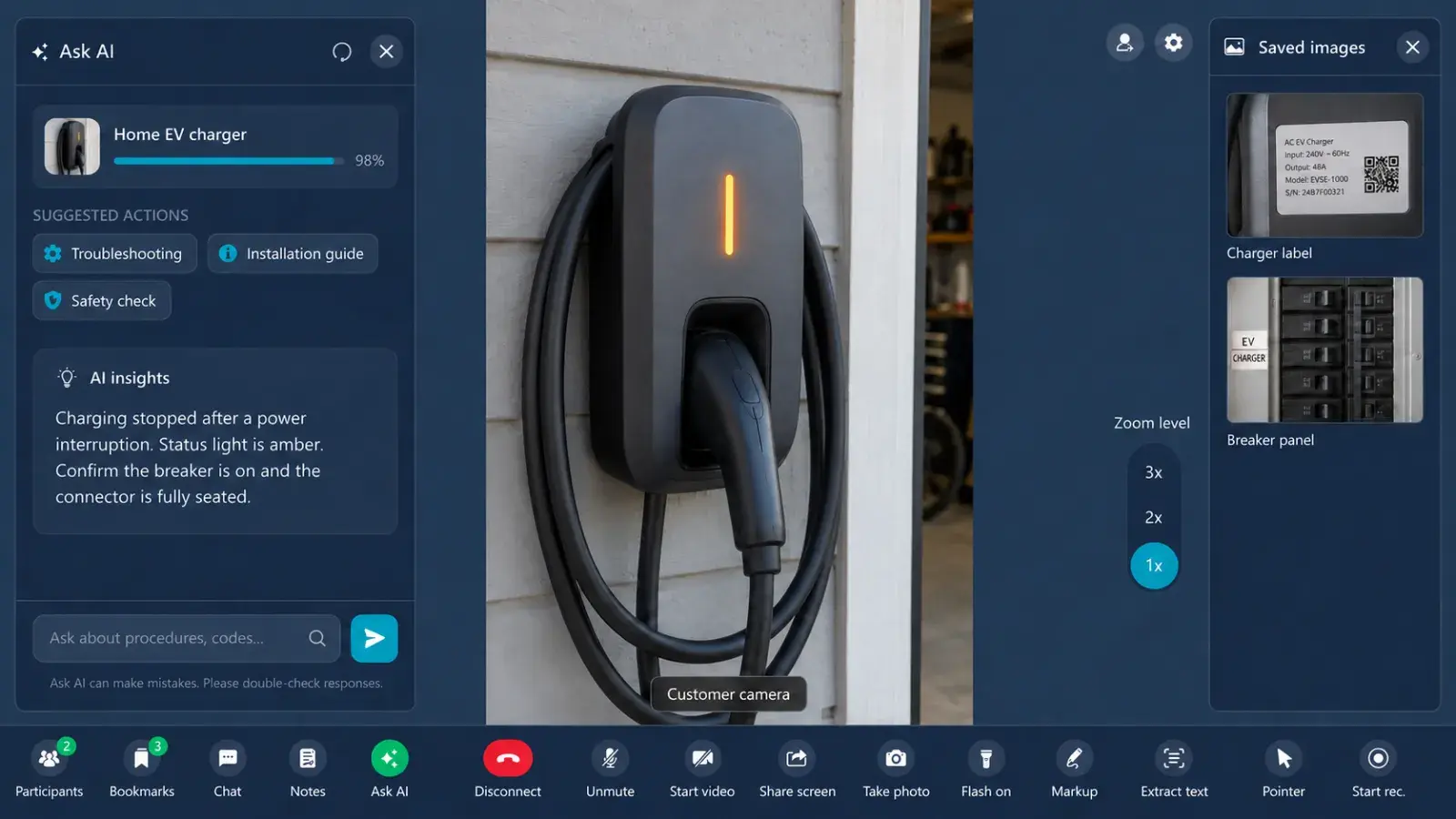
Most tools record the call. Owlbert understands it.
Owlbert AI runs in the background of every Blitzz session. It reads what the customer shows, connects it to a cause and puts the fix in front of your agent.
It sees
Reads live video and shared screens. Equipment, model numbers, indicator lights, damage, wiring, error codes.
It reasons
Connects what is on screen to the likely cause. A red LED on a known model becomes a diagnosis.
It resolves
Searches your articles, manuals and past tickets and shows the exact steps with a match score.
It documents
Writes the summary and notes and syncs them with photos to your CRM.
- Reseat the WAN cable in the yellow port
- Power cycle for 30 seconds
- Confirm the light turns solid white
AI that moves the numbers.
Results reported by Blitzz customers.
From what am I looking at to here's the fix.
Customer joins
One tap on a secure link opens their camera or screen in the browser.
Owlbert watchesAI
AI reads the scene and identifies the equipment and the symptom.
Insight appearsAI
A plain language read of the problem plus the matching article, in the session panel.
Issue resolvedAI
The agent guides the fix. Notes, photos and the summary sync to your CRM.
Owlbert AI in every product.
ConciergeAI
Reads live phone video to identify equipment and symptoms, then brings up the fix from your knowledge base.
InspectAI
Identifies equipment and model plates, keeps the checklist on track and writes the inspection report.
Co-BrowseAI
Ask AI on a screenshot of the customer's page to read errors and settings and suggest the fix.
ScreenShareAI
Reads error codes and dialogs on the shared screen and surfaces the matching article.
BlitzzCamAI
AI walkthroughs, photo tagging and search, plus auto notes and reports for field crews.
Across every sessionAI
Live chat translation, AI call summaries and notes synced to your CRM.
Answers from your own content.
Owlbert learns from your articles, manuals and past tickets. Every answer is ranked and cited, and it improves as resolutions feed back in.
Works in the tools you already use.
Summaries, notes and photos sync straight to the systems your team already uses.
Available across Blitzz
Owlbert AI works inside Concierge, Inspect, Co-Browse, ScreenShare and BlitzzCam. See plans for the product that fits your team.
Questions about Owlbert AI
What is Owlbert AI?
Owlbert AI is the AI layer built into Blitzz. It reads live video and shared screens, finds the likely cause, surfaces answers from your knowledge base and writes the summary and notes.
Which Blitzz products work with Owlbert AI?
Concierge, Inspect, Co-Browse, ScreenShare and BlitzzCam.
Where do Owlbert's answers come from?
Your own content: knowledge base articles, manuals and past tickets. Each answer shows its source and a match score.
What is Ask AI?
During a session the agent captures a frame or screenshot. Owlbert identifies what is shown and answers from your knowledge base, including troubleshooting steps and checklists.
Does Owlbert replace my agents or inspectors?
No. Owlbert assists. Your team makes the decisions and guides the customer.
Do customers need an app?
No. Customers join from a link in their browser.
Where do summaries and notes go?
They sync to your CRM or help desk, such as Salesforce, Zendesk, ServiceNow, Genesys, HubSpot and Microsoft Dynamics 365.
Put Owlbert AI on your team.
Start free and see AI find the fix on your next call.
Prefer a walkthrough? Book a demoTrusted by support, field and inspection teams at enterprises, cities and public agencies









.png?width=56&height=56&name=City%20of%20Salem%20(%20Through%20Dell).png)
