On this page
Remote work and remote support are now the default for most teams, so picking the right remote support software matters. TeamViewer is a popular choice, but it is not the only one. If you want lower pricing, a browser-based option, or live video help for customers, there are strong TeamViewer alternatives in 2026. This list compares nine applications like TeamViewer so you can pick the best fit.
What is the best TeamViewer alternative?
The best TeamViewer alternative depends on who you support. For IT teams that need full remote control of a computer, AnyDesk, Splashtop or ConnectWise Control are solid picks. For customer support teams that need to see a product, a device or a jobsite, a live video tool like Blitzz works better because the customer joins from a link with no app to install.
1. Blitzz
Best for: Remote support and collaboration with a focus on customer satisfaction.
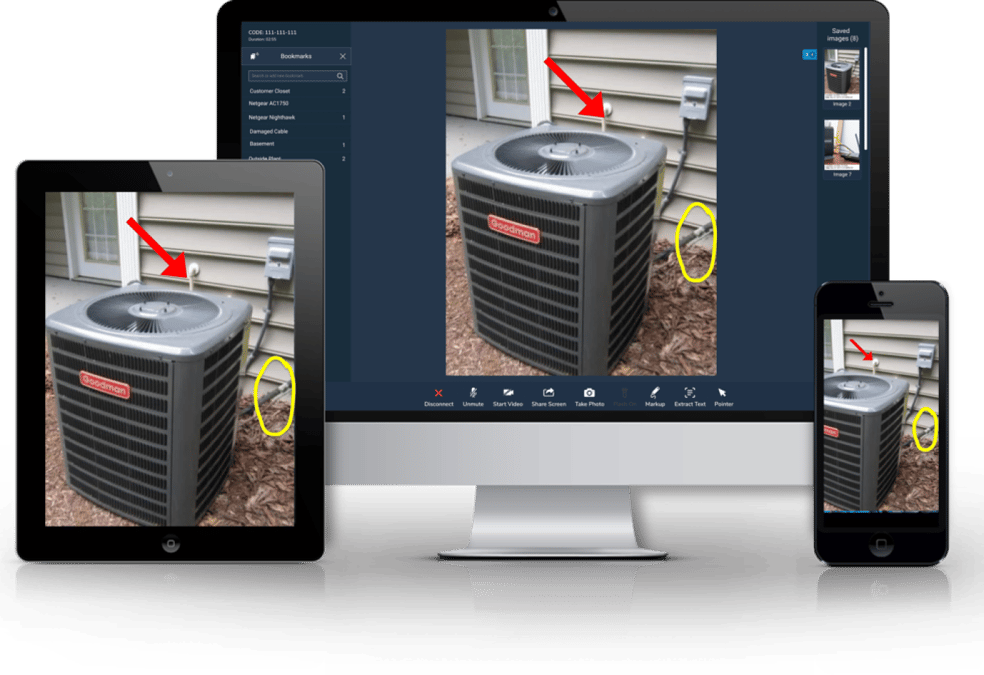
Blitzz is a standout alternative for remote support software, combining ease of use with robust functionality. Blitzz enables live video support, screen sharing, co-browsing and remote troubleshooting from a simple link. It is an ideal solution for businesses that want to resolve issues faster and improve customer experience.

Key Features:
Secure, app-free live video support
Integration with CRM and helpdesk tools
Augmented reality markup for hands-on troubleshooting
Owlbert AI call summaries and Agent Assist
Pricing: Flexible plans tailored to different business needs. Contact Blitzz for a quote.
2. AnyDesk
Best for: Lightweight and fast remote access.
AnyDesk is a lightweight alternative to TeamViewer that delivers high-speed connections. It is suited for small teams and individual users who want speed and simplicity.

Key Features:
High frame rates with low latency
Cross-platform compatibility
AES-256 encryption
Pricing: Paid plans; check the vendor site for current pricing.
3. LogMeIn Rescue
Best for: Large enterprises with high-security requirements.
LogMeIn Rescue is designed for enterprises that need a scalable solution for remote support. With advanced security features and integrations, it suits IT teams managing complex environments.

Key Features:
Multi-platform support
Detailed session reporting
Two-factor authentication
Pricing: Enterprise pricing available on request.
4. Splashtop
Best for: Budget-conscious businesses.
Splashtop offers affordable remote access without dropping essential features. It is a good fit for teams that want to stay productive on a tight budget.
Key Features:
Easy deployment and setup
4K streaming capabilities
File transfer and remote printing
Pricing: Low per-user plans; check the vendor site for current pricing.
5. Zoho Assist
Best for: Integration with other Zoho products.
Zoho Assist is a remote support and access tool for businesses that already use Zoho apps. Its tight integration makes it attractive for Zoho users.
Key Features:
Unattended remote access
Voice and video chat support
Browser-based sessions
Pricing: Free plan available; paid plans per technician.
6. Parallels Access
Best for: Remote access to applications.
Parallels Access focuses on remote access to applications, which suits professionals who need to run specific software remotely.
Key Features:
Seamless app navigation
Mobile optimization
Remote desktop access
Pricing: Low-cost annual plans for personal use.
7. Chrome Remote Desktop
Best for: Free and simple remote access.
Chrome Remote Desktop is a free application like TeamViewer. It is a good choice for individuals or small businesses with light remote support needs.
Key Features:
Easy setup via Google Chrome
Cross-platform compatibility
Secure connections
Pricing: Free.
8. ConnectWise Control
Best for: IT teams and MSPs.
Formerly known as ScreenConnect, ConnectWise Control is a powerful tool for IT teams and managed service providers that need advanced remote access and support.
Key Features:
Customizable branding
Advanced troubleshooting tools
Session recording
Pricing: Per-technician plans; check the vendor site for current pricing.
9. VNC Connect
Best for: Flexible remote access solutions.
VNC Connect offers remote access tools for personal and professional use. Its flexibility makes it a strong contender on this list.
Key Features:
Cloud and direct connections
Multi-platform support
High-grade encryption
Pricing: Per-device plans; check the vendor site for current pricing.
How to choose an application like TeamViewer
Before you switch, answer four questions:
Do you need to control a computer, or see the real world? Remote desktop tools control screens. Live video tools let you see equipment, devices and sites through the customer's phone camera.
Can your customer install software? Many customers will not. Browser-based, link-to-join tools remove that step.
What do you need to record? Look for session recordings, photos, notes and AI summaries that sync to your CRM or helpdesk.
How is it priced? Compare per-user, per-device and per-session pricing against how your team actually works.
Choosing the Right TeamViewer Alternative
The best TeamViewer alternative for your business depends on your needs. If you want live video support and CRM integration, Blitzz stands out. For budget-friendly options, consider Splashtop or Chrome Remote Desktop. Enterprises with advanced requirements may prefer LogMeIn Rescue or ConnectWise Control.
FAQ
Is there a free application like TeamViewer?
Yes. Chrome Remote Desktop is free, and Zoho Assist has a free plan. Free tools work well for personal use but usually lack reporting, branding and integrations.
What is the best TeamViewer alternative for customer support?
For customer-facing support, a tool that works in the browser with no download is usually best. Blitzz lets agents start a live video, screen share or co-browse session from a link and see the problem right away.

Blitzz Team
The Blitzz Team writes about remote video support, virtual inspections and field service. Our guides come from working with home builders, property managers, warranty teams, contact centers and field service organizations that use Blitzz to see and solve issues without a truck roll.