.png?width=120&height=55&name=Blitzz-Logo-right%20white%20eyes%20-%20not%20transparent%20(3).png)


On this page
SaaS companies live and die by how quickly customers see value. Whether you run a social media management platform, analytics tool, CRM, or customer support app, your users don’t buy software just to “figure it out later.” They expect a smooth setup, fast onboarding, and instant help when they get stuck. The problem is that even the best-designed platforms still come with learning curves, integrations, and settings that can overwhelm new users.
That’s where cobrowsing solutions become a game-changer. Instead of relying on long help articles, back-and-forth chats, or confusing screenshots, your support team can guide customers in real time directly inside your product. Cobrowse technology lets agents securely see the user’s screen and walk them through integrations, feature setup, and workflows step by step. The result? Faster onboarding, fewer abandoned trials, happier customers, and more upgrades from free users to paying subscribers.
In this article, we’ll walk you through how cobrowsing technology helps SaaS companies accelerate onboarding, guide users through integrations in real time, and turn new sign-ups into confident, long-term customers.

What Is Cobrowsing for SaaS?
Cobrowsing is a real-time support technology that allows your customer success or support team to see and navigate a user’s web app together with them — directly inside the browser. Instead of asking customers to explain what they see, send screenshots, or jump onto third-party screen-sharing tools, agents can securely view the same page and guide users step by step.
For SaaS companies, this is especially powerful during onboarding, feature adoption, and troubleshooting. When a new user gets stuck setting up integrations, configuring settings, or learning complex workflows, cobrowsing lets your team jump in instantly and show them exactly what to click, where to go, and how to complete the task.
Unlike traditional screen sharing, cobrowsing is lightweight, secure, and app-free. Customers simply click a link from chat or email and are connected in seconds — removing friction and keeping them inside your product experience.
In short, cobrowsing turns confusing onboarding moments into guided, real-time experiences that help SaaS users reach value faster and reduce churn before it starts.
How Does It Work?
Step 1 — Customer signs up and needs help
A new user downloads or signs up for your SaaS product and begins onboarding. They hit a roadblock while setting up integrations, configuring settings, or learning how a feature works, so they reach out to support via chat or helpdesk.
Step 2 — Agent sends a secure cobrowse link
Your support agent sends a secure cobrowsing link directly through chat, email, or your helpdesk platform. No apps or downloads are required.
Step 3 — Customer clicks and connects instantly
The customer simply clicks the link and is instantly connected through their browser. Within seconds, the agent can see the same page the customer sees.
Step 4 — Guide the customer in real time
The agent highlights buttons, scrolls, points, and guides the user step by step through the process. Together, they complete the task quickly and clearly.
Step 5 — Problem solved in minutes
The issue gets resolved during the same session, reducing back-and-forth messages, speeding up onboarding, and leaving the customer confident using your product.
Why Cobrowsing Matters For SaaS Companies
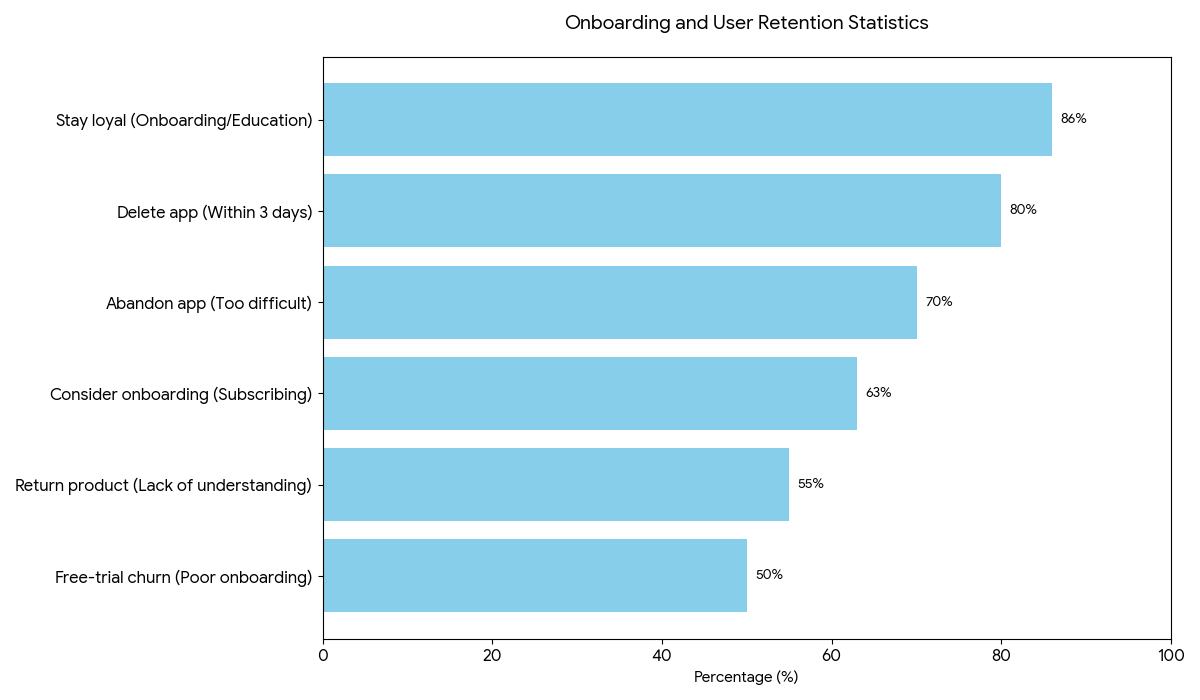
Did you know that many SaaS companies that offer great products still struggle with sales and customer retention due to complexities during onboarding? If you're one of the companies that have experienced struggle, try to take a look at this roundup.
• 70% of users abandon an app because they find it too difficult to use ~ Sanjay Dey
• 55% of customers return a product because they don’t understand how to use it.
• 63% of customers consider onboarding when deciding whether to subscribe ~ Churchzero
• 80% of users delete an app within 3 days if they don’t understand how to use it ~ Gitnux
• Poor onboarding is responsible for up to 40–60% of free-trial churn according to ProfitWell and Totango.
• 86% of customers say they’d stay loyal to a product that invests in onboarding and education.

How Cobrowsing Changes The Game
Faster Issue Resolution
Cobrowsing removes the back-and-forth that slows support down. Instead of asking for screenshots or long explanations, agents can instantly see the customer’s screen and guide them in real time. Problems that used to take hours or days can now be solved in minutes.
Improved Customer Experience
Customers no longer feel lost, confused, or frustrated when they get stuck. Real-time guidance makes support feel personal, helpful, and effortless. This builds trust and leaves customers with a positive impression of your brand.
Higher First-Contact Resolution
Because agents can see exactly what the customer sees, issues are solved in one interaction more often. This reduces repeat tickets, follow-ups, and unnecessary escalations. Support becomes more efficient and less stressful for everyone.
Reduced Average Handle Time (AHT)
Cobrowsing shortens every support session. Agents spend less time troubleshooting blindly and more time guiding customers directly to the solution. This allows teams to help more customers without increasing headcount.
More Signups and Higher Conversions
Cobrowsing helps customers complete registrations, trials, and upgrades without confusion. When users get stuck during onboarding or checkout, real-time guidance removes friction and keeps them moving forward. This leads to more completed signups and fewer drop-offs.
Better ROI for Support Teams
By resolving issues faster and reducing ticket volume, cobrowsing helps support teams do more with fewer resources. Businesses save time, reduce operational costs, and maximise the impact of their support team.
Takeaway
Onboarding is the make-or-break moment for SaaS products. Complicated setups, confusing integrations, and unanswered questions can frustrate users, increase churn, and reduce conversions. Cobrowsing solutions like Blitzz transform this experience by letting support teams guide customers in real time, directly in your app. Users complete onboarding faster, understand your product better, and see value immediately — leading to more activated users, higher retention, and ultimately, increased revenue.
Ready to see it in action? Book a demo with Blitzz today and turn onboarding into a competitive advantage.

Blitzz Team
The Blitzz Team writes about remote video support, virtual inspections and field service. Our guides come from working with home builders, property managers, warranty teams, contact centers and field service organizations that use Blitzz to see and solve issues without a truck roll.