.png?width=120&height=55&name=Blitzz-Logo-right%20white%20eyes%20-%20not%20transparent%20(3).png)

On this page

The Chaos of Launch Day
Imagine this: your startup has finally launched its long-awaited app. Excitement is high, but within the first 48 hours, your support inbox explodes. Users can’t complete tasks, features aren’t behaving as expected, and your engineering team is pulled into a whirlwind of urgent bug fixes. What was meant to be a smooth launch quickly turns into a firefight.
This is the all-too-familiar world of post-launch chaos. Startups often underestimate how much friction early users can encounter, and how quickly small issues snowball into bigger problems. The result? Frustrated customers, stressed teams, and delayed product improvements.
But it doesn’t have to be this way. With cobrowsing solutions, startups can drastically reduce the confusion, speed up problem-solving, and turn a potentially stressful launch into a smoother, more controlled rollout.
What Is Cobrowsing?
Cobrowsing, short for collaborative browsing, is a tool that lets your support or product team see exactly what your users see on their screen—without asking them to take screenshots, record their screens, or explain every click. Think of it as “walking through your app with the user, in real time.”
Unlike traditional screen sharing or remote desktop tools, cobrowsing is lightweight, secure, and specifically designed for guiding users through web or app interfaces. There’s no complex setup for the user, and sensitive information stays protected.
For startups, this real-time visibility is a game-changer. It allows your team to spot user struggles immediately, provide guidance on the spot, and prevent misunderstandings that would otherwise turn into support tickets or negative reviews. In short, cobrowsing gives your team eyes on the problem before it becomes a crisis.
The Problem: Post-Launch Firefighting
After launch, even small issues can create a ripple effect. Users get stuck, submit support tickets, and engineers get pulled away from planned work to chase bugs that could have been quickly resolved. Miscommunication between support and engineering only adds to the chaos, and delays frustrate both users and internal teams.
For example, imagine a user struggling to complete a checkout process. They submit a ticket describing the problem, but it’s vague. Support has to follow up, then relay it to engineering. By the time it’s fixed, multiple users have experienced the same frustration, churn risk rises, and everyone is stressed.
Post-launch firefighting isn’t just annoying—it’s costly. It impacts customer satisfaction, slows down iteration, and distracts teams from strategic priorities. Without a way to see what the user sees in real time, these challenges multiply, making a launch feel more like crisis management than a celebration.
How Cobrowsing Solves These Problems
Cobrowsing turns chaotic support situations into smooth, guided experiences. When a user gets stuck, your support team can see exactly what they see and guide them in real time. No more guessing, no more long email threads—issues get resolved quickly, and tickets drop significantly.
It also acts as an early warning system for UX/UI problems. When multiple users struggle with the same workflow, your team spots patterns immediately instead of waiting for complaints to pile up. Small usability issues that would have led to repeated tickets can now be fixed proactively.
Not every problem requires engineering. Cobrowsing allows support to resolve minor issues on the spot, freeing your developers to focus on bigger improvements instead of firefighting minor hiccups.
Finally, cobrowsing improves communication between support, product, and engineering teams. Everyone sees the same issue firsthand, reducing misunderstandings and speeding up collaboration. No more translating vague tickets or playing phone tag between teams—everyone works from the same visual context.
Benefits Beyond Support
The value of cobrowsing doesn’t stop at customer support. Observing real users in real time provides deep product insights. You can see which features are intuitive and which confuse users, informing future design and development decisions.
It also leads to reduced churn and higher satisfaction. Users feel supported and understood, and early frustrations are solved before they turn into cancellations.
Startups save time and money because repeated fixes and back-and-forth tickets are eliminated. Teams spend less time firefighting and more time building meaningful features.
Additionally, cobrowsing enhances onboarding and feature adoption. New users can be guided through key workflows visually, ensuring they understand your app from day one. This helps users feel confident, engaged, and more likely to stick around.
Best Practices for Using Cobrowsing Pre- and Post-Launch
- Integrate cobrowsing into your support workflow early. Make it a natural part of how your team responds to tickets, so guidance feels seamless for users.
- Train your team for efficient guidance. Encourage support staff to actively walk users through issues without taking control of the session entirely—users should feel guided, not overridden.
- Balance privacy and security. Make sure sensitive data is protected, and users know exactly what your team can see during a session. Transparency builds trust.
- Leverage cobrowsing data for product decisions. Track common friction points, feature usage, and user behaviours to inform UX improvements, reduce future tickets, and prioritise fixes.
By following these practices, startups can turn cobrowsing into a strategic advantage—reducing launch-day chaos, improving user experience, and giving teams the insights they need to iterate faster.
A Quick Comparison: Cobrowsing vs Screen Sharing
Not all visual support tools are created equal. Here’s a quick look at how cobrowsing stacks up against traditional screen sharing:
| Feature | Cobrowsing | Screen Sharing | Traditional Support |
| Real-time guidance | ✅ | ✅ | ❌ |
| Secure & private | ✅ | ❌ | ✅ |
| Reduces engineering load | ✅ | ❌ | ❌ |
| Tracks user behaviour for insights | ✅ | ❌ | ❌ |
| Seamless user experience | ✅ | ❌ | ❌ |
In short, cobrowsing gives your team real-time, actionable insight, while traditional screen sharing mostly just lets you look over a user’s shoulder. For startups, that difference can mean faster resolutions, happier users, and less post-launch chaos.
The Power of Cobrowsing
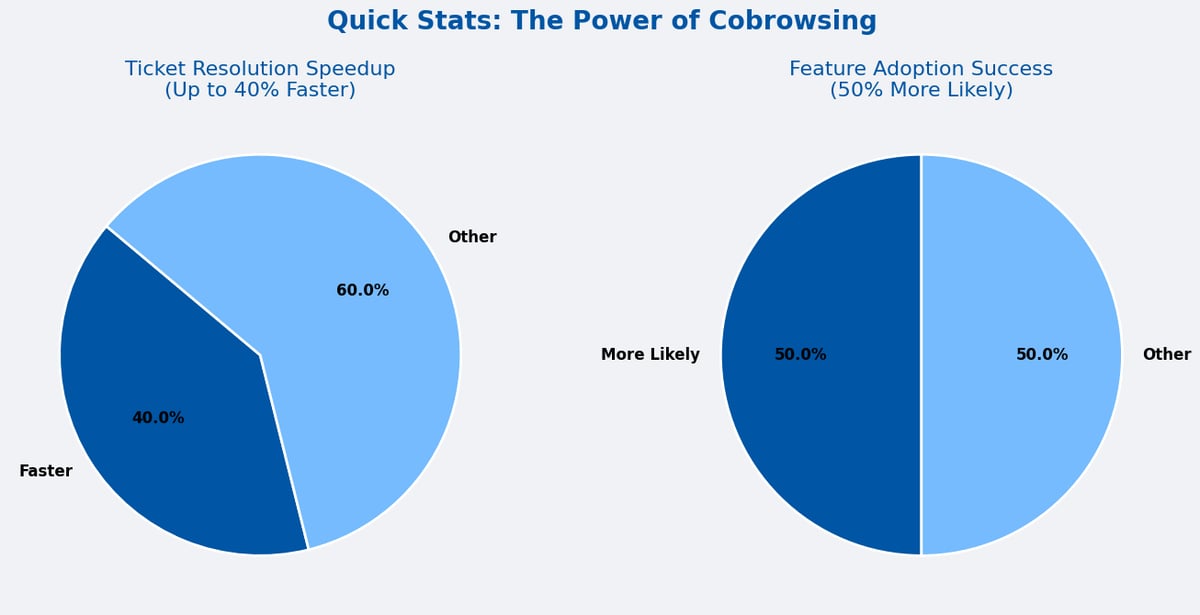
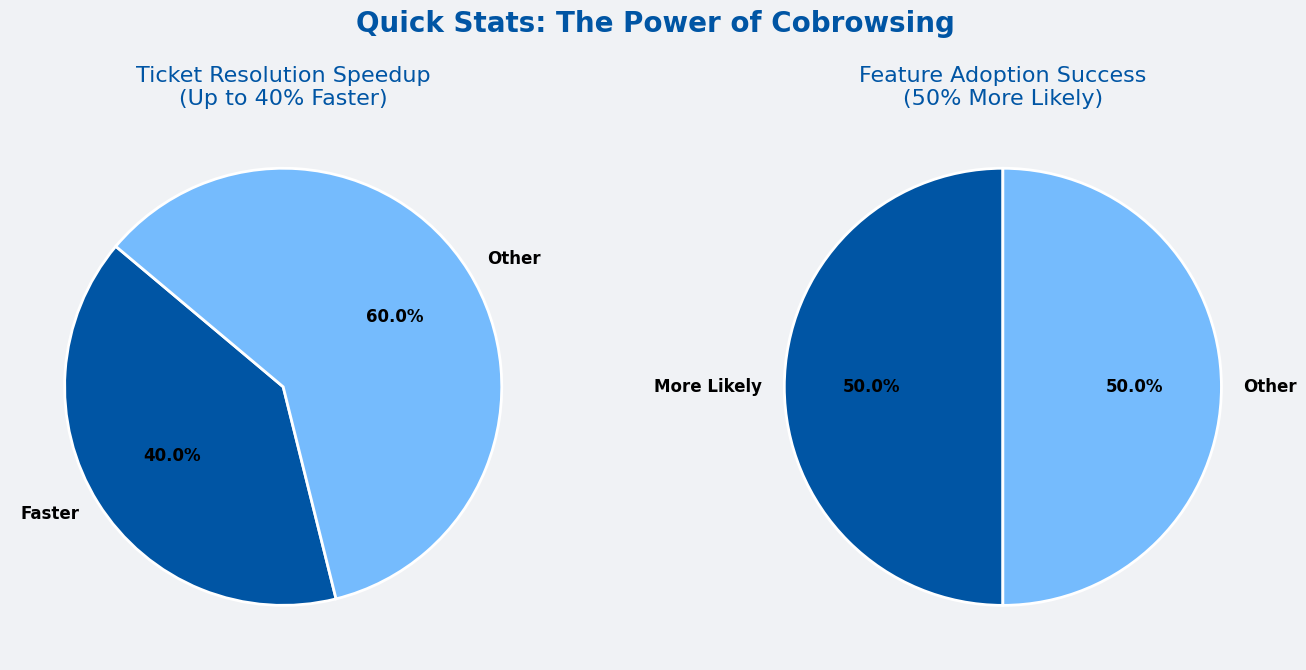
The power of cobrowsing lies in its ability to turn real-time visibility into immediate action. Companies using cobrowsing report up to 40% faster ticket resolution and see users adopt new features 50% more effectively. By guiding users directly through your app, cobrowsing not only resolves issues faster but also boosts satisfaction, reduces churn, and gives teams the insights they need to improve the product before small problems turn into big ones.
Conclusion
Launching a new app or software doesn’t have to feel like a firefight. Post-launch chaos—from overflowing support tickets to stressed engineering teams—is a common challenge, but it’s also preventable. Cobrowsing provides real-time visibility into user sessions, letting your team guide users directly, spot UX issues early, and resolve problems before they escalate. By bridging the gap between support, product, and engineering, startups can reduce friction, improve customer experience, and reclaim precious time to focus on meaningful product improvements.
Startups that embrace cobrowsing can launch with confidence. Early users feel supported, support teams work more efficiently, and engineers spend less time chasing minor bugs. If you’re looking to minimise post-launch chaos and make your app experience seamless, it’s time to explore cobrowsing tools for your team.
Looking ahead, visual collaboration tools like cobrowsing are shaping the future of product launches. As apps become more complex and customer expectations rise, the ability to see, guide, and resolve in real time will no longer be optional—it will be a critical part of successful launches.

Blitzz Team
The Blitzz Team writes about remote video support, virtual inspections and field service. Our guides come from working with home builders, property managers, warranty teams, contact centers and field service organizations that use Blitzz to see and solve issues without a truck roll.