.png?width=120&height=55&name=Blitzz-Logo-right%20white%20eyes%20-%20not%20transparent%20(3).png)

On this page
What Are Virtual Site Inspections (And Why They're Replacing Truck Rolls)

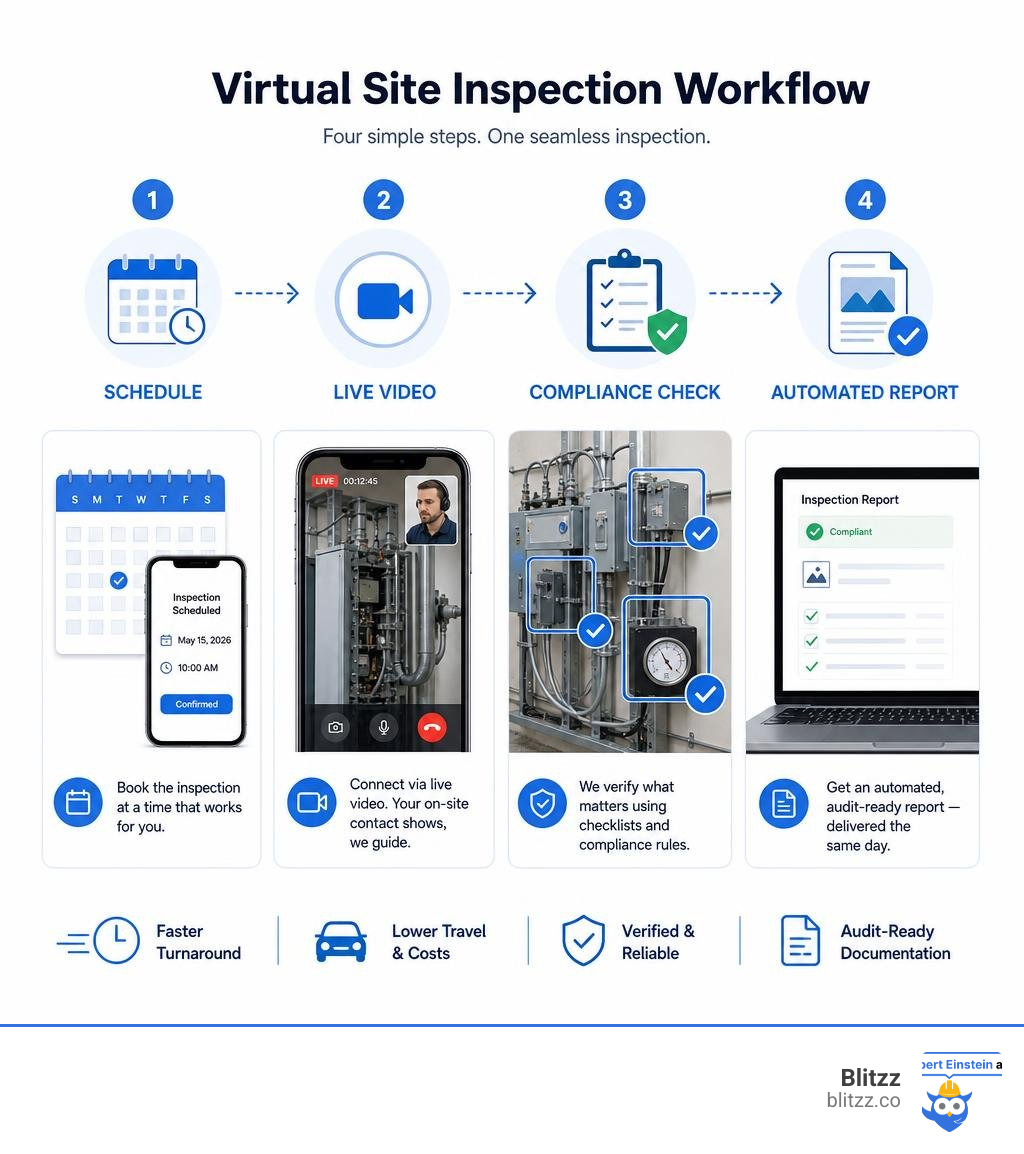
Virtual site inspections are remote assessments where an inspector evaluates a property, asset, or piece of equipment using live video, photos, or 360° streaming — without physically traveling to the location.
Here's a quick breakdown of what that means in practice:
- What it is: A real-time or asynchronous visual review conducted over a secure video connection from any location
- Who guides it: A trained remote inspector who directs an on-site contact (or the occupant) to capture the right angles, data, and documentation
- How it's verified: GPS coordinates, timestamps, and metadata confirm the location and authenticity of every photo or video
- How long it takes: Most inspections complete in 15–30 minutes, compared to 7–14 business days for traditional on-site visits
- What you get: An automated, audit-ready report with photos, checklists, and compliance validation — delivered the same day
If you manage field operations for a telecom, utility, or property services company, the math is straightforward. Every unnecessary truck roll costs you time, money, and a technician's availability. Traditional inspections involve scheduling conflicts, windshield time, and administrative overhead that can stretch a simple site check into a multi-day process.
Virtual inspections cut through all of that.
Research shows they can reduce on-site reviews by 80%, lower field and travel costs by 30–50%, and achieve 70% faster inspection turnaround. One program reduced its total inspection timeframe down to just 2 business days, with some inspections completed in as little as 15 minutes.
The technology isn't new anymore — it's proven, scalable, and being deployed across insurance, construction, telecom, utilities, and government building departments. The question isn't whether virtual inspections work. It's whether your team is set up to run them well.
This guide walks you through exactly how to do that.
Understanding Virtual Site Inspections vs. Traditional Methods
To fully appreciate why organizations are pivoting toward remote workflows, we have to look at how traditional inspections stack up against modern, digitized alternatives. For decades, verifying the status of a construction project, assessing property damage, or auditing utility infrastructure meant sending a physical body to a physical location. Today, that model is increasingly difficult to justify.
| Feature | Traditional On-Site Inspections | Virtual Site Inspections |
|---|---|---|
| Travel & Windshield Time | High (hours or days spent driving to locations) | Zero (completed entirely from a remote desk) |
| Turnaround Time | Typically 7 to 14 business days | Down to 2 business days (often under 30 minutes) |
| Scheduling Bottlenecks | Severe (coordinating calendars for multiple parties) | Minimal (on-demand or instant scheduling links) |
| Carbon Footprint | Significant (heavy reliance on fleet vehicle travel) | Negligible (zero travel emissions) |
| Average Cost | High (fuel, vehicle maintenance, inspector hours) | Reduced by 30% to 50% |
| Data Authenticity | Manual notes, loose photos, easily misplaced files | Secure metadata, GPS tracking, automated reports |
While some assume that "virtual" simply means jumping on a standard video call, the operational differences run much deeper. To understand why, it helps to explore the distinction between basic remote video calls and structured Virtual Inspection vs. Remote Video Inspection: What's the Difference? which highlights how purpose-built tools provide the structure, security, and integration that standard consumer apps lack.
Defining the Virtual Shift
The transition to virtual workflows is more than a change in communication channels; it is a fundamental shift in how we handle visual verification. Instead of relying on static, paper-based processes, virtual inspections leverage real-time video streaming, interactive markup tools, and automated data collection to verify compliance.
During a virtual session, the remote inspector does not just watch a screen. They actively guide the on-site operator or property occupant, using laser-pointer style annotations, taking high-resolution remote snapshots, and filling out standardized checklists in real time. This interactive approach ensures that the visual evidence gathered is just as reliable—if not more so—than a traditional walk-through.
Key Operational Differences
The most immediate impact of eliminating physical travel is the eradication of "windshield time"—the wasted hours technicians and inspectors spend sitting in traffic. By removing this barrier, inspectors can easily transition from one assignment to the next in seconds, scaling their daily capacity from two or three on-site visits to a dozen or more remote sessions.
Furthermore, the administrative overhead associated with traditional reporting disappears. Instead of an inspector spending their evening organizing digital camera photos, matching them to paper notes, and typing up reports, modern virtual inspection platforms auto-generate documentation. Every photo taken during the live stream is automatically tagged with GPS coordinates, a secure timestamp, and descriptive labels, compiling an audit-ready report the moment the call ends.
Key Industries and Use Cases for Remote Inspections
From dense urban construction zones to remote utility stations, virtual inspections are proving their value across a diverse range of sectors. Any industry that relies on visual verification to approve work, release funds, or manage risk can benefit from transitioning to a remote model.
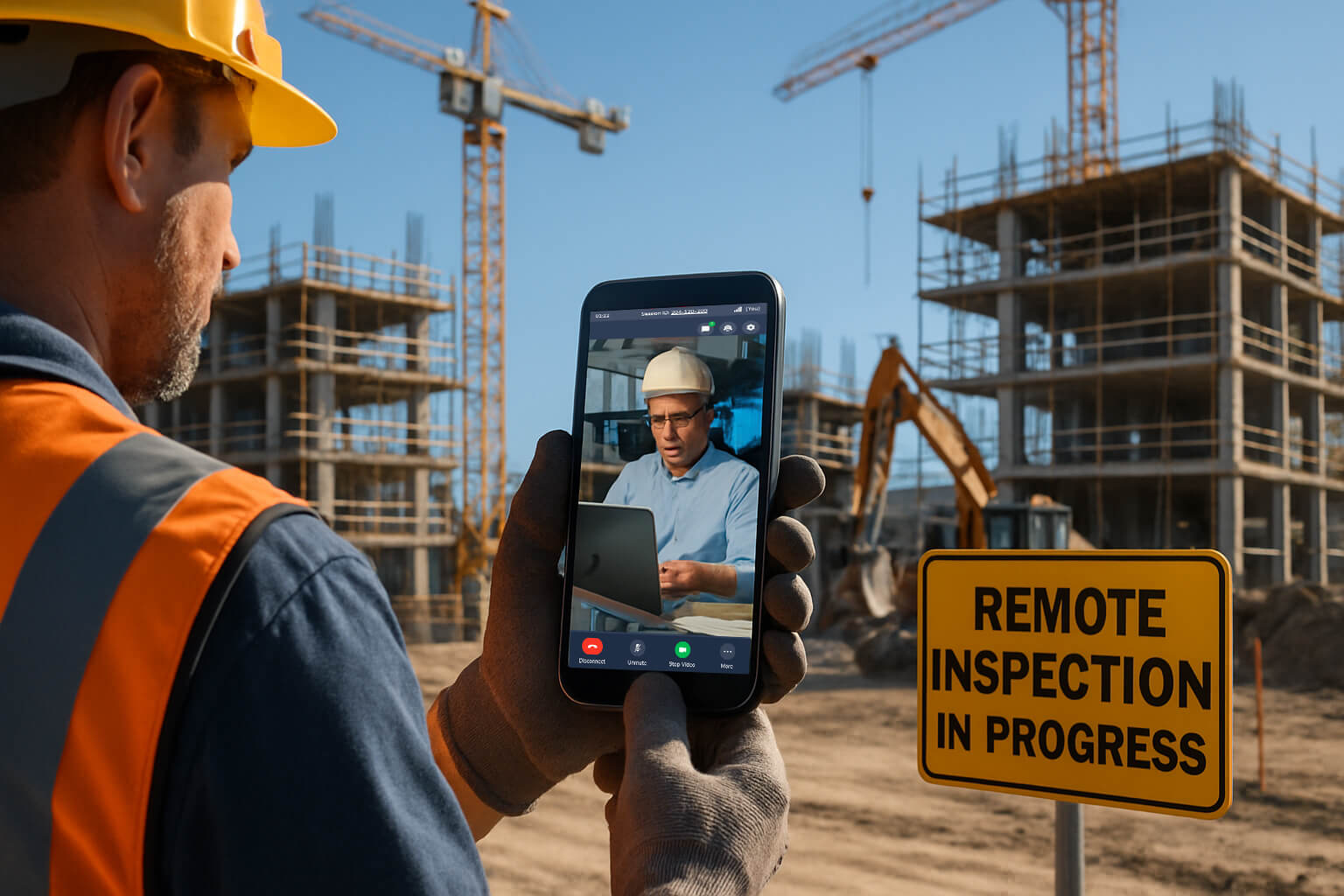
To explore the wider landscape of these applications, you can read our detailed guide on What is a Virtual Property Inspection: Types, Benefits, Challenges which covers how organizations balance efficiency with data integrity.
Commercial, Residential, and Insurance Use Cases
In commercial and residential real estate, virtual inspections streamline property management, leasing, and valuations.
- Desktop Appraisals & Valuations: Lenders pair automated valuation models (AVMs) with occupant-guided virtual walkthroughs to verify property conditions without waiting weeks for an in-person appraiser.
- Occupancy & Condition Checks: Property managers can verify tenant occupancy, inspect the state of a rental unit, or perform routine maintenance audits without disrupting the occupant's schedule.
- Insurance Claims Adjustments: When disaster strikes, policyholders can use their mobile browsers to show claims adjusters the damage in real time. This speeds up the claims process, turning what used to be a multi-week waiting game into same-day approvals.
How Telecom, Solar, and Utilities Leverage Virtual Site Inspections
For heavy infrastructure and renewable energy sectors, the benefits are even more pronounced. We regularly see organizations in these spaces use remote visual tools to manage complex, geographically dispersed assets. If you are in the building sector, you can see how this applies directly to project management in our resource on Remote Video Inspections for Construction.
- Telecom Tower Audits: Instead of sending specialized climbing teams to every tower for routine checks, a local technician can use a ground-based camera or drone feed connected to a remote expert. This keeps highly paid specialists off the road and focused on high-value troubleshooting.
- Solar Installation & Site Readiness: Solar providers use virtual assessments to check roof conditions, electrical panel capacity, and shading issues before dispatching installation crews. This ensures that when the crew arrives, they have the exact parts and tools needed, raising first-time fix rates.
- Utility Infrastructure Checks: Routine safety audits of substations, water treatment facilities, and pipeline crossings can be conducted remotely, protecting staff from hazardous environments while maintaining regulatory compliance.
The Measurable Benefits of Remote Inspections
Adopting virtual site inspections is not just about keeping up with technology; it is about driving measurable business outcomes. The data gathered from thousands of deployments across various industries paints a clear picture of the efficiency gains waiting to be unlocked.
Speed, Cost Savings, and Safety Metrics
The financial and operational impacts of remote inspections are immediate and substantial:
- 80% fewer on-site reviews: By triaging issues virtually, organizations reserve physical travel only for highly complex or high-risk cases.
- 30% to 50% lower field and travel costs: Eliminating fuel, vehicle wear-and-tear, and travel hours directly improves bottom-line margins.
- 70% faster turnaround times: Inspections that used to take up to two weeks are resolved in hours, keeping projects on schedule and customers happy.
- 50% to 70% faster exception resolution: When a dispute or installation error occurs, remote experts can instantly jump on a live video call to troubleshoot and approve the fix, avoiding costly project delays.
- Improved Safety and Accident Prevention: Keeping junior technicians or inspectors out of dangerous environments—such as high rooftops, electrical rooms, or deep trenches—reduces on-the-job accidents.
Compliance and Regulatory Alignment
Municipalities and government agencies are also embracing the virtual shift. For example, the Los Angeles Department of Building and Safety offers a Virtual Inspection | LADBS program, allowing contractors to complete inspections for HVAC replacements, solar installations, and minor residential remodels via real-time video.
To help organizations navigate these official requirements, our Building Official Guide to Remote Video Inspections provides a roadmap for aligning virtual workflows with local building codes and standards.
Technology and Tools: Powering Virtual Site Inspections
To achieve these benefits, organizations need the right technology stack. Relying on generic, consumer-grade video calling apps often leads to frustration, compliance risks, and poor-quality data.
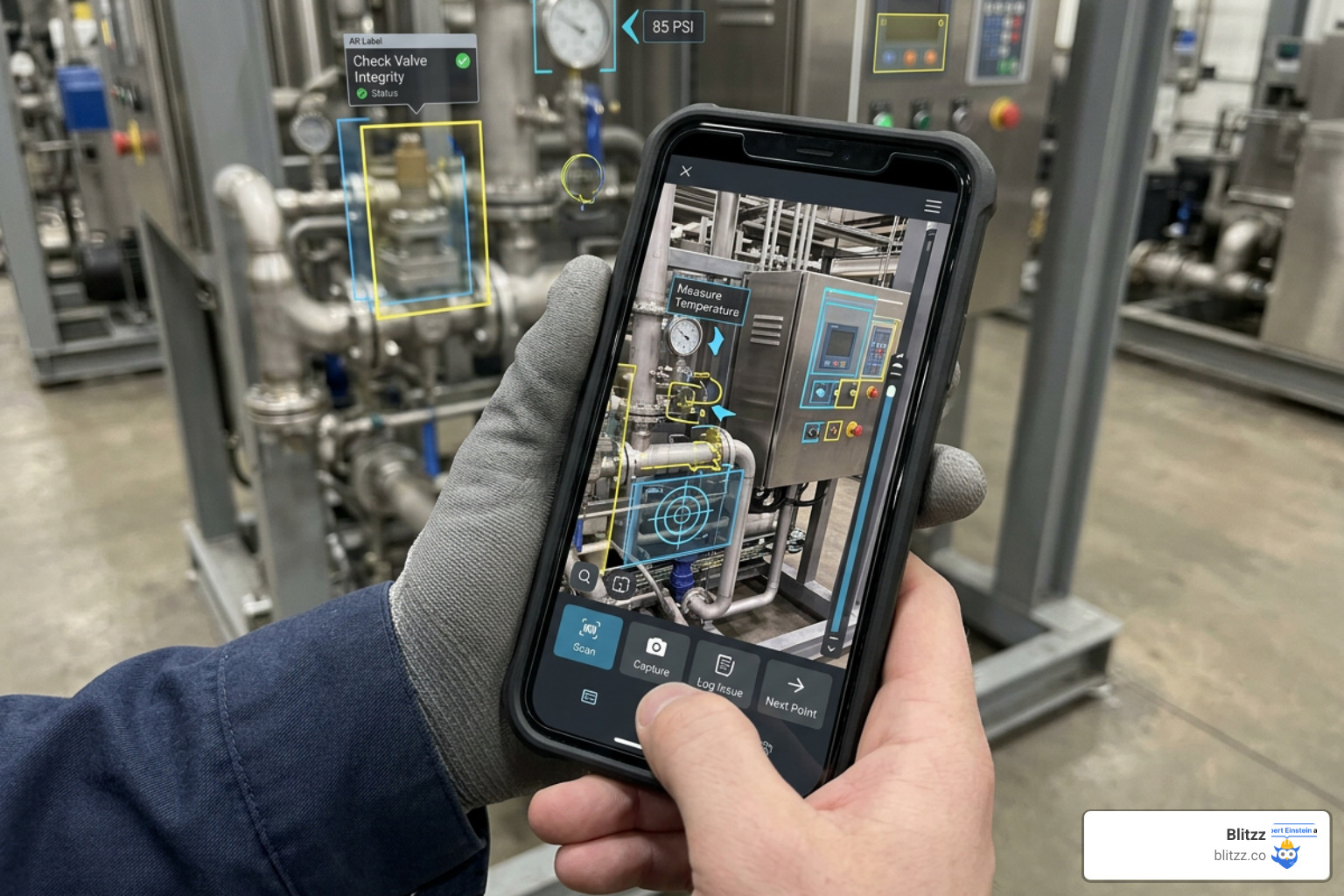
For a deeper look at the software landscape, check out our evaluation of the Best Remote Video Inspection Software.
Essential Hardware and Software Requirements
An enterprise-ready virtual inspection system must be accessible, reliable, and secure. We believe the best approach is a browser-based, app-free experience for the person on-site. Expecting a homeowner, tenant, or external contractor to download a bulky mobile app, register an account, and configure permissions is a recipe for high abandonment rates. With a browser-based tool, the inspector simply texts or emails a secure link; the recipient clicks it, and their mobile browser immediately opens a secure, high-definition video stream.
On the inspector's side, key software features should include:
- Interactive AR Annotations: The ability to draw, circle, and place arrows directly onto the live video feed to guide the on-site operator.
- Remote Camera Control: Allowing the inspector to toggle the on-site device's flashlight, zoom in on serial numbers, and snap high-resolution photos remotely.
- Offline Functionality: When working in basements, remote utility sites, or steel-framed commercial buildings, cellular signals can drop. Software with offline-capable dynamic forms allows operators to capture data and photos locally, automatically syncing them to the cloud once a connection is restored.
- CRM and FSM Integrations: Automatically pushing inspection reports, photos, and metadata directly into your existing field service management or customer relationship management platforms.
Advanced Technologies: Digital Twins and 360° Video
For complex environments, advanced spatial technologies are elevating remote assessments to new heights:
- Digital Twins: By creating dimensionally accurate 3D replicas of a physical space, teams can explore a facility, take measurements, and review structural layouts asynchronously. This provides rich spatial context that standard 2D photos simply cannot match.
- 360° Live Video: Using portable, lightweight 360° cameras, an on-site operator can walk through a facility while multiple remote participants join the stream. Crucially, each remote viewer has independent control over their perspective—they can look up, down, left, or right, completely independent of where the camera holder is looking. This simulates the freedom of a physical site walk and eliminates the feeling that the on-site operator is "hiding" issues from the camera.
Overcoming Challenges: Security, Fraud Prevention, and Adoption Barriers
While the benefits of virtual site inspections are clear, transitioning away from physical visits does introduce unique challenges that organizations must proactively manage.
Mitigating Fraud with Geotagging and Metadata
A common concern among risk managers and underwriters is the potential for fraud. How do you know the photo of the roof or electrical panel was actually taken at the target property today, and not pulled from an old folder or a different site?
To prevent this, enterprise virtual inspection platforms use tamper-resistant evidence-gathering features:
- Locked Camera Capture: Photos can only be taken live within the secure session, preventing users from uploading pre-saved or edited images.
- GPS Geolocation Tracking: The software automatically cross-references the mobile device's real-time GPS coordinates with the target property's address, flagging any discrepancies.
- Secure Cryptographic Timestamps: Every piece of visual evidence is hard-coded with metadata containing the exact date, time, and location of capture, establishing a reliable audit trail.
Addressing Connectivity and Standardization Issues
Technical and cultural barriers can also slow down adoption. In a survey of industry professionals, 59% cited concerns over virtual inspection inaccuracy, 39% noted a lack of communication between stakeholders, and 35% pointed to a lack of consistent universal standards.
To overcome these hurdles, we recommend:
- Low-Bandwidth Optimization: Choose platforms that can dynamically adjust video quality or support offline capture so that inspections do not grind to a halt in poor signal areas.
- Standardized Digital Checklists: Use step-by-step digital forms that guide the on-site user through the exact data points required. This ensures consistency and prevents inspectors from missing critical details.
- Change Management: Provide brief, clear training for your team and emphasize that virtual tools are designed to make their lives easier by eliminating long drives and tedious paperwork.
Step-by-Step: How to Conduct a Virtual Inspection in 30 Minutes
With the right preparation and tools, a standard virtual inspection can be completed quickly and thoroughly. Here is our step-by-step blueprint for a seamless 30-minute session.
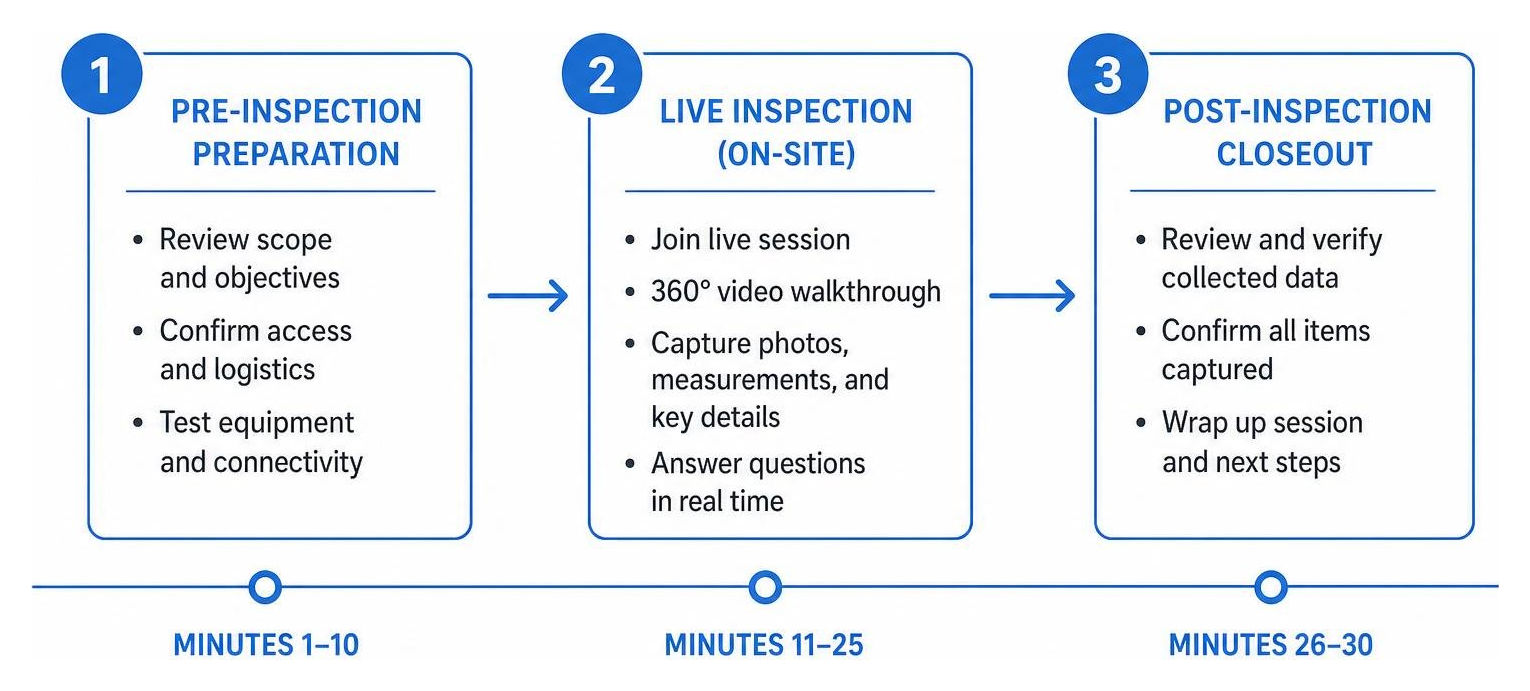
Phase 1: Pre-Inspection Preparation (Minutes 1-10)
A successful remote inspection starts before the camera turns on.
- Verify Eligibility and Permits: Ensure that the target inspection type is approved for virtual review by local authorities or internal policy.
- Select the Template: Open your inspection software and load the specific digital checklist for the job (e.g., "Solar Site Readiness" or "Residential HVAC Compliance").
- Send the Secure Link: Generate an instant access link and text or email it to the on-site contact.
- Brief the Participant: Have a quick phone call to explain the process, confirm they have a fully charged device, and ask them to gather basic tools (like a flashlight, tape measure, or level) if needed.
Phase 2: Live Video Walkthrough (Minutes 11-25)
This is the core of the inspection, where the remote inspector guides the visual assessment.
- Verify the Location: Ask the on-site contact to start the video stream outside the property, capturing the building address numbers to confirm the location.
- Follow the Checklist: Methodically guide the contact through the pre-loaded steps. For example, "Please walk to the electrical panel, open the door, and hold steady."
- Use AR Tools and Flashlight Control: If the area is dark, toggle their device's flashlight remotely. Use AR arrows on their screen to point to specific labels, valves, or components you need to see.
- Capture High-Res Snapshots: Click the remote capture button to snap clear, high-resolution photos of serial numbers, model plates, and overall conditions. The software will automatically attach these to the correct checklist item.
Phase 3: Compliance and Report Generation (Minutes 26-30)
Wrap up the session and secure your documentation.
- Review the Data: Quickly check your digital form to ensure all required fields are complete and all photos are clear.
- End the Session: Thank the on-site contact and close the connection.
- Verify Metadata: The system automatically validates the GPS coordinates and timestamps, linking them to the job order.
- Generate and Share the Report: Click to compile the automated, audit-ready PDF report, which is instantly saved to your cloud storage and pushed to your CRM or FSM system.
Frequently Asked Questions
Can virtual inspections fully replace traditional on-site visits?
No, and they are not designed to. Virtual inspections are most effective when used as part of a hybrid model. They are perfect for routine checks, progress monitoring, preliminary triaging, and simple compliance verifications. Complex, high-risk, or highly specialized assessments will still require an expert physically on-site. By using virtual tools for routine work, you free up your highly skilled inspectors to focus on those complex cases.
What happens if there is no internet connection during the inspection?
If you are using an enterprise-grade platform with offline capabilities, the on-site operator can still complete the inspection. The software will load the dynamic form and allow them to take photos and input data locally. Once the device reconnects to Wi-Fi or cellular service, all captured data and media will automatically sync to the cloud, ensuring no work is lost.
How do virtual inspections prevent fraud and ensure data authenticity?
Reputable virtual inspection software uses several layers of defense. This includes locking the camera to prevent the upload of old or edited photos, automatically capturing real-time GPS coordinates, and embedding secure cryptographic timestamps into the image metadata. These features create a tamper-resistant trail that gives risk and compliance teams confidence in the integrity of the data.
Conclusion
As we navigate July 2026, the digital transformation of field operations is no longer a future projection—it is a current reality. Companies that continue to rely solely on traditional, travel-heavy inspection models risk falling behind on efficiency, cost control, and customer satisfaction.
By adopting virtual site inspections, you can eliminate unnecessary truck rolls, protect your workforce, and deliver faster, more reliable results for your clients.
At Blitzz, we help enterprises across telecom, insurance, utilities, and construction transition to modern, remote visual workflows. Our instant, browser-based video support, interactive AR annotations, and robust integrations make it easy to scale your inspection program with confidence.
Ready to see how much time and money you can save? Start Your Virtual Inspection Journey with Blitzz today.

Blitzz Team
The Blitzz Team writes about remote video support, virtual inspections and field service. Our guides come from working with home builders, property managers, warranty teams, contact centers and field service organizations that use Blitzz to see and solve issues without a truck roll.