.png?width=120&height=55&name=Blitzz-Logo-right%20white%20eyes%20-%20not%20transparent%20(3).png)

On this page
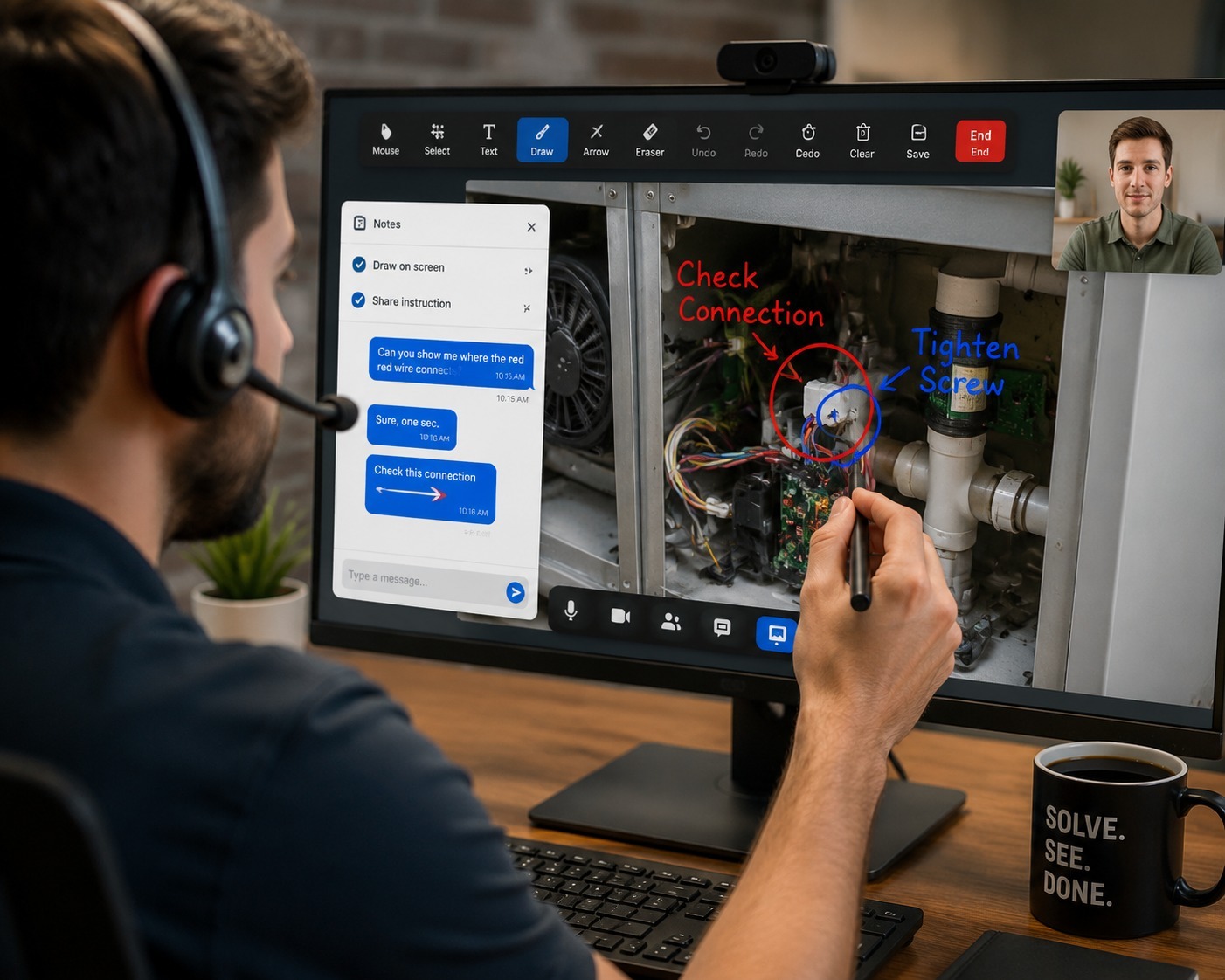
"Okay, now look at the top left of your screen. No — your top left, not mine. Do you see a small gear icon?" If you've ever listened to a support call like this, you already understand the core problem AR annotation solves: verbal directions are a genuinely inefficient way to point at something. Drawing directly on a customer's live screen replaces an entire category of confusing verbal instruction with a single, unambiguous gesture.
What AR Annotation Actually Is
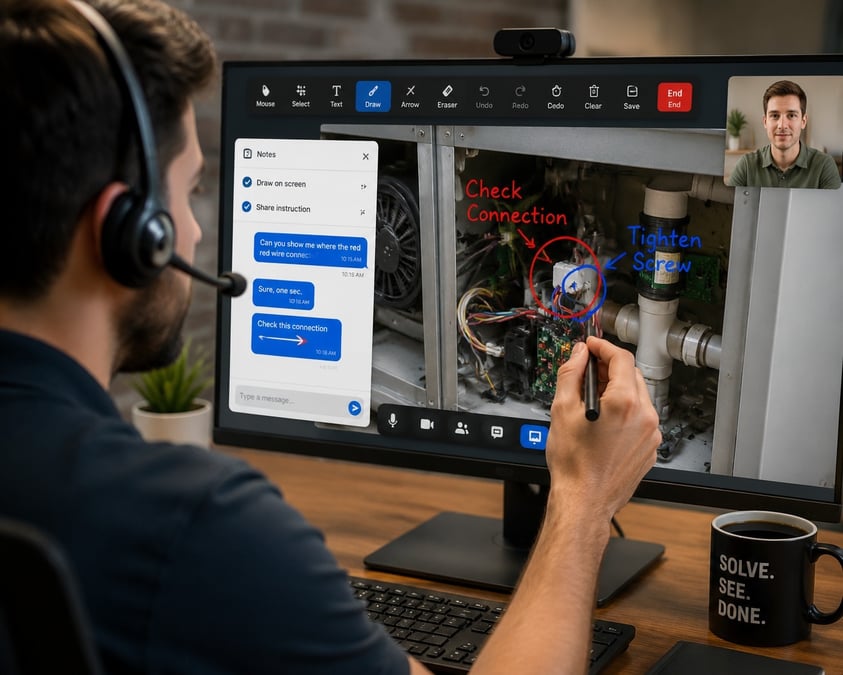
Augmented reality annotation, in a remote support context, means an agent can draw, highlight, or point directly on a customer's live screen or camera view in real time — an arrow pointing at a specific button, a circle around a setting, a highlighted field on a form. The customer sees these marks appear live, overlaid on exactly what they're already looking at, rather than trying to translate a verbal description into the right physical action themselves.
This is a meaningfully different interaction model than a standard voice or video call. A broader explanation of AR remote assistance describes how the technology bridges the gap between remote experts and on-site or remote users by overlaying digital information directly onto what someone is already seeing — turning abstract verbal guidance into a concrete visual instruction that's much harder to misread.
The Research Behind Why Annotation Works
This isn't just a nice user-experience touch — there's a meaningful body of research quantifying how much annotation improves outcomes compared to voice-only guidance. A controlled study on remote quality inspection found that error rates dropped from over 20% with no visual assistance down to under 3% when annotation-based remote assistance was used, with the vast majority of remote experts in the study preferring the annotated approach over traditional screen-based guidance. Similar findings show up in manufacturing contexts: a user study on visual annotation cues found that annotation and drawing cues helped users complete collaborative tasks faster, with fewer errors and better overall understanding, compared to guidance without any visual marking.
The improvement isn't limited to error rates either — it shows up in precision. Research on spatial referencing in remote assistance found a 30% improvement in spatial accuracy when annotation-based remote assistance was used compared to a standard video call without any overlay capability. In practice, that's the difference between telling a customer "the setting is somewhere near the top" and drawing a circle directly around the exact setting in question.
Why This Matters More for Screen-Based Support Than It Might Seem
Most of the research on AR annotation comes from industrial and manufacturing contexts, but the underlying mechanism — reducing the gap between "the expert knows where the thing is" and "the other person can find the thing" — applies just as directly to everyday customer support. Live annotation research on remote assistance more broadly confirms that overlaying visual cues onto a live shared view consistently reduces miscommunication and task errors compared to voice-only guidance, regardless of whether the task involves physical equipment or a software interface.
For screen-based support specifically, this translates into exactly the kind of interaction Blitzz ScreenShare is built around: an agent watching a customer's live screen and annotating directly on it — drawing an arrow to the right menu item, highlighting a field that needs to be filled in, circling an error message the customer might have scrolled past. Instead of a multi-step verbal exchange ("go to settings, then account, then look for a toggle near the bottom"), the agent simply marks the exact spot, and the customer follows a visual cue instead of a set of remembered directions.

Why Voice-Only Guidance Breaks Down So Easily
It's worth pausing on why verbal directions fail as often as they do. Screens are spatial, but voice is linear — you can only describe one location relative to another one word at a time ("top," then "left," then "the third icon"), and each additional qualifier is another opportunity for the listener to misinterpret which direction "left" means from their perspective versus the agent's. This is a well-documented limitation in remote guidance research generally: shared spatial grounding is difficult to establish through words alone, which is exactly why annotation-based approaches consistently outperform voice-only instruction across the studies on this topic. An arrow doesn't have this ambiguity problem — there's no "your left or my left" confusion when the mark appears directly on the thing being pointed at.
This also explains why annotation tends to help most with customers who are the least comfortable with technology. A confident, tech-savvy customer can often follow verbal directions even when they're slightly ambiguous, filling in gaps based on prior experience with similar interfaces. A less experienced customer has no such prior experience to draw on, and is far more dependent on an unambiguous visual cue to find the right button or field. Teams that see the highest support-ticket volume from less tech-savvy customer segments — common in insurance and telehealth support — tend to see the largest relative improvement from adding annotation to their existing support workflow.
Some support scenarios lean on annotation more heavily than others. Consumer electronics troubleshooting often involves guiding a customer through unfamiliar settings menus where verbal directions alone are especially prone to getting lost in translation. Telecom and internet provider support frequently deals with router and modem configuration screens where a highlighted field saves several minutes of "no, the other dropdown" back-and-forth. IT help desks use the same technique for operating system settings and application configuration issues that are hard to describe accurately over voice alone.
Banking and fintech support uses annotation to guide customers through application forms field by field, while sensitive data stays protected through the same consent-based session model. Insurance teams use it to walk policyholders through claims portals, circling exactly which section needs attention rather than describing a page layout verbally. Retail and e-commerce support teams use annotation to guide shoppers through account or order-management screens quickly, and healthcare device support teams rely on it to guide patients through device setup steps that would be difficult to describe accurately over the phone alone.
Annotation Beyond the Screen
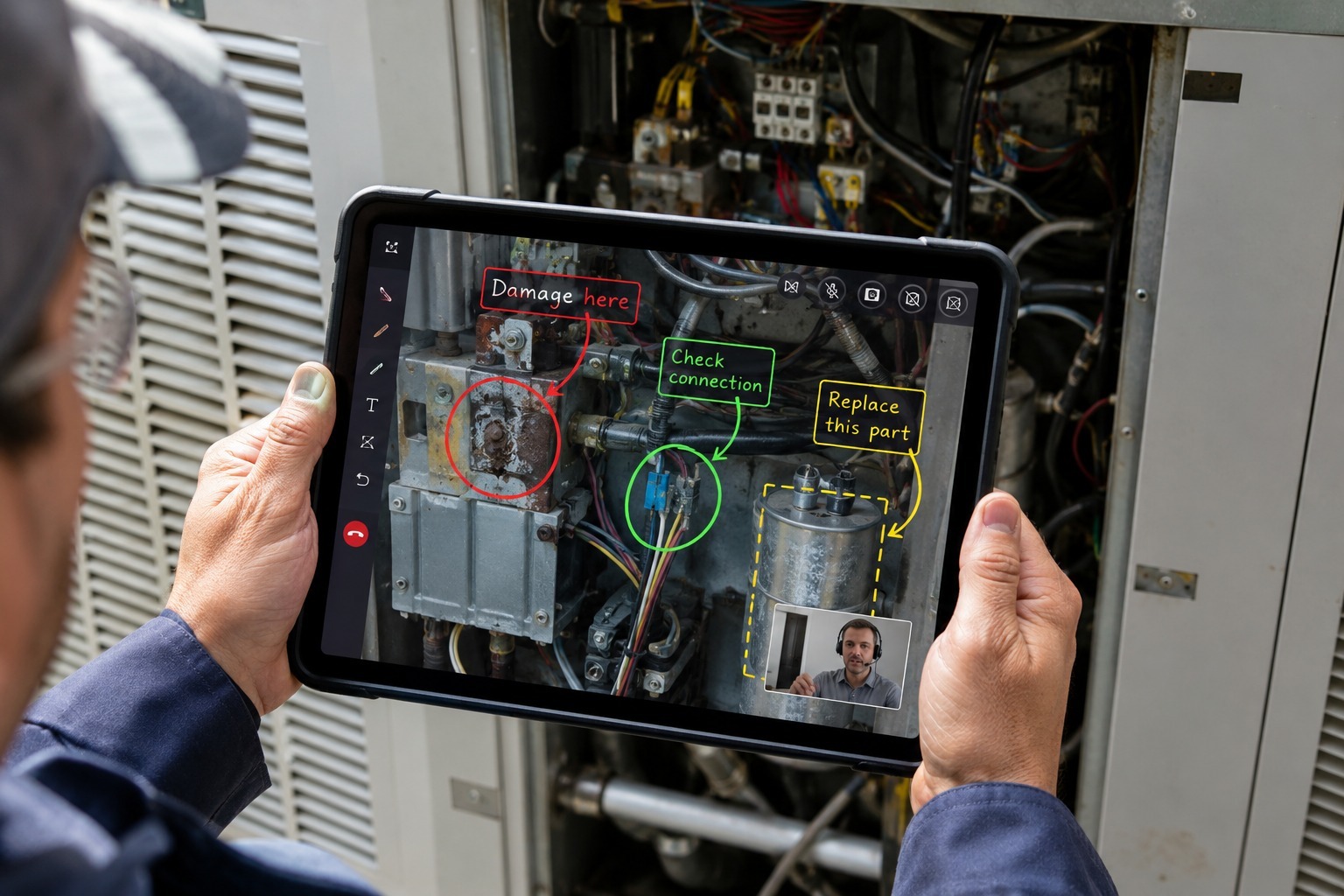
The same underlying principle extends to physical inspection work through Blitzz Inspect, where a remote expert can annotate directly on a live camera feed of physical equipment rather than a screen — circling a component, marking where a part needs to be replaced, or highlighting a specific area of damage. This is especially valuable for manufacturing and heavy equipment inspections, where a technician benefits from a remote expert pointing at the exact component in question rather than trying to interpret a verbal description of "the part near the left panel." Construction and utilities inspection teams apply the same model for site walkthroughs and equipment checks.
Combining Annotation With Live, On-Frame Context
Annotation works best alongside live video or audio context rather than as a standalone feature — a live view paired with the ability to draw on it, plus a voice channel to explain what's being marked, covers the full range of guidance a support interaction typically needs. ScreenShare's live, on-frame context allows exactly this combination, integrating with Salesforce, Zendesk, and Genesys so annotated sessions sync directly into existing support workflows without any separate system to manage.
Teams evaluating annotation-based support can review the full feature set, browse case studies, or compare pricing to see how annotation fits into an overall support cost model.
Frequently Asked Questions
Does live annotation require any special hardware on the customer's side?
No — annotation works through any modern browser, the same way the underlying ScreenShare session does, with no download or special equipment required on the customer's end.
Is there research supporting annotation over voice-only guidance specifically?
Yes. Controlled studies comparing annotated remote assistance to voice-only and screen-based guidance consistently show meaningfully lower error rates and higher user preference for the annotated approach.
Does annotation work for physical inspections, not just software screens?
Yes — the same principle applies through Blitzz Inspect, where a remote expert can annotate directly on a live camera feed of physical equipment or a job site.
How does annotation interact with consent-based, masked sessions?
Annotation only marks up what's visible in the session — it doesn't bypass any field masking already in place, so banking and other regulated support teams can use annotation alongside existing data protections without any additional exposure.
Ready to see live annotation in action on your own support workflows? Schedule a demo or contact sales, and browse the Blitzz blog for more on visual support techniques.

Blitzz Team
The Blitzz Team writes about remote video support, virtual inspections and field service. Our guides come from working with home builders, property managers, warranty teams, contact centers and field service organizations that use Blitzz to see and solve issues without a truck roll.