.png?width=120&height=55&name=Blitzz-Logo-right%20white%20eyes%20-%20not%20transparent%20(3).png)
If your support team is still manually creating tickets, logging session notes, or copy-pasting customer data between apps after every call, you're leaving time — and money — on the table. The modern customer expects fast, seamless service. And the modern support team deserves tools that work just as hard as they do.
That's exactly why the integration between Blitzz and Zapier is such a game-changer. Together, these two platforms create an automation engine that connects your remote visual support workflow to hundreds of the apps your team already uses — no coding required. Whether you're running a contact center, managing field inspections, or delivering visual customer support across industries, this integration helps you move faster, work smarter, and serve better.
Let's break down what this means for your team, your customers, and your bottom line.
What Is Blitzz, and Why Does Remote Visual Support Matter?
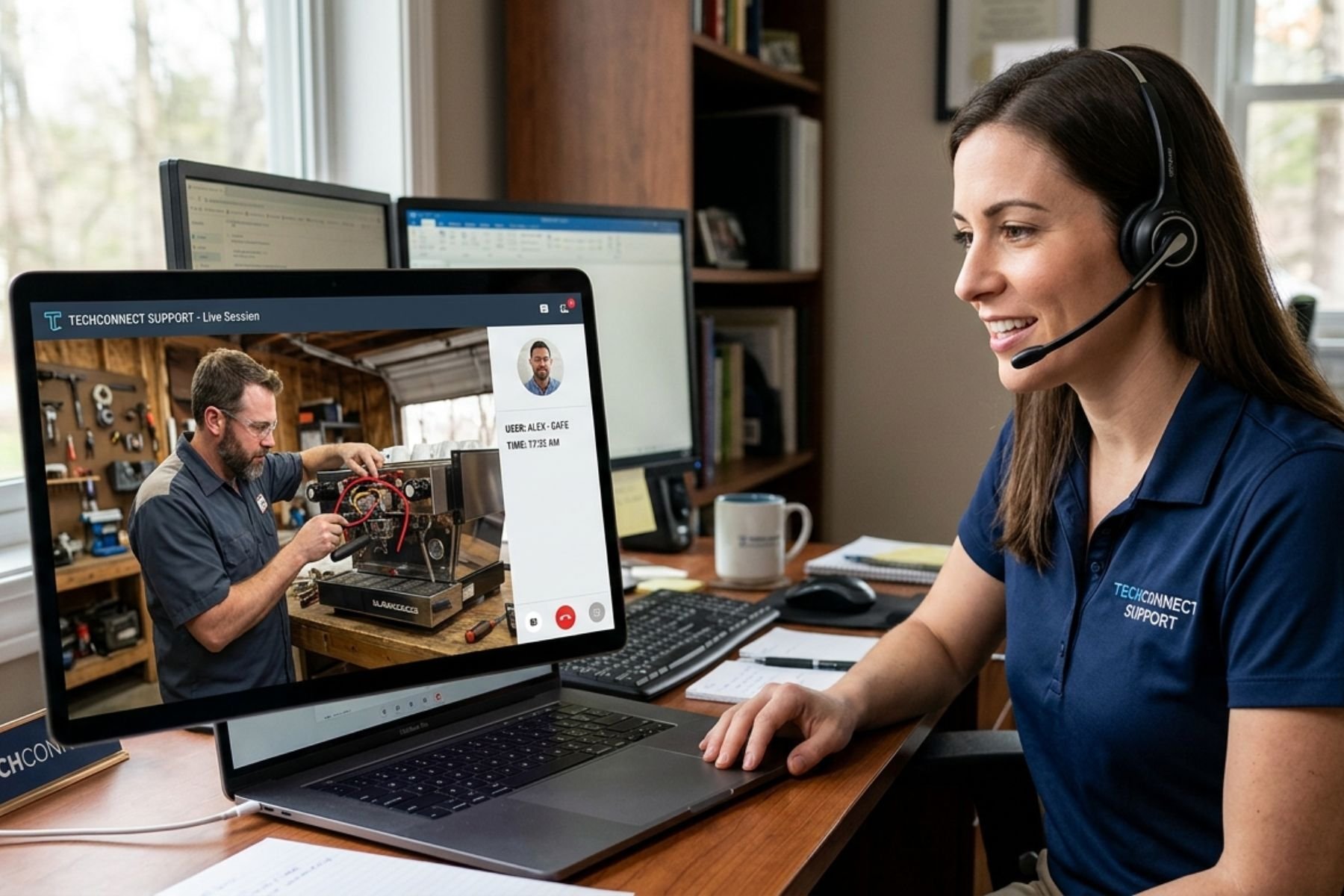
Blitzz is an AI-powered remote visual support platform built for teams that solve problems at a distance. Using live video, augmented reality annotations, screen sharing, and co-browsing, Blitzz lets support agents see exactly what the customer sees — in real time, from anywhere in the world.
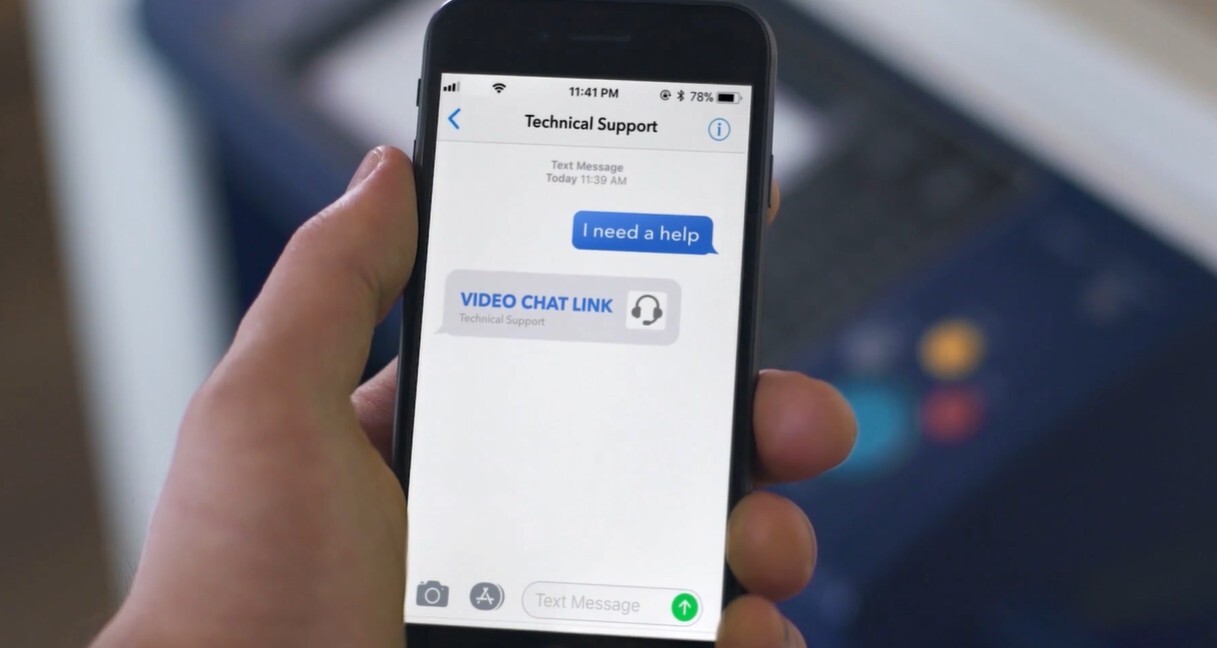
Instead of asking a frustrated customer to describe a blinking error light or a broken appliance, an agent can simply send them a secure link via SMS, email, or WhatsApp. The customer clicks the link, no app download required, and within seconds the agent is looking through the customer's camera. They can annotate the screen, zoom in on details, capture photos, and walk the customer through a resolution — all without ever leaving the office.
The results speak for themselves. Blitzz helps businesses reduce truck rolls by up to 60%, achieve a 95% customer connection rate, and resolve issues three times faster than traditional support methods. Industries from telecom and insurance to automotive and healthcare have adopted remote visual support not just as a cost-saving measure, but as a genuine upgrade to the customer experience.
But as powerful as the live session itself is, what happens after the session ends matters just as much. That's where Zapier comes in.
What Is Zapier, and How Does It Complement Blitzz?
Zapier is one of the world's most popular automation platforms, connecting over 6,000 apps through simple "if this, then that" workflows called Zaps. You don't need to be a developer to use it. If you can describe what you want to happen in plain English — "when a Blitzz session ends, create a ticket in Zendesk" — Zapier can make it happen automatically.
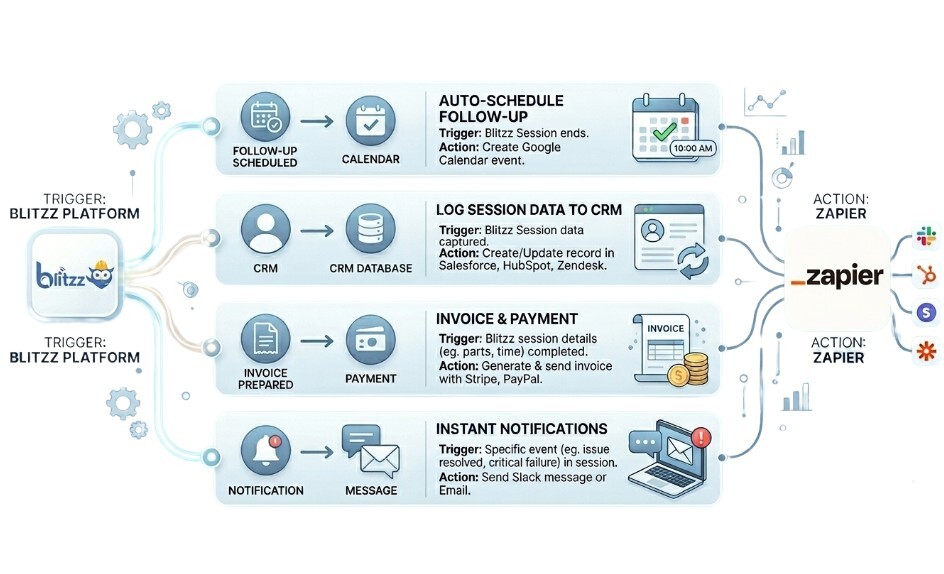
When you connect Blitzz to Zapier, you unlock the ability to trigger automated actions based on events that happen inside your remote visual support sessions. A completed session becomes the starting point for a whole chain of events: tickets get created, CRMs get updated, teams get notified, data gets logged, and follow-ups get scheduled — all without a human lifting a finger.
This is the power of automation applied to visual customer support. It means your agents spend more time actually helping customers, and less time doing administrative work between calls. Learn more about how you can integrate Blitzz into your Zapier workflow and automate remote visual support.
Key Workflows You Can Automate with Blitzz and Zapier
1. Auto-Create Support Tickets After Every Session
One of the most common — and most tedious — tasks in any support operation is creating a ticket after a customer interaction. With the Blitzz-Zapier integration, this happens automatically the moment a session wraps up.
You can configure a Zap so that when a Blitzz remote visual support session ends, a new ticket is instantly created in your helpdesk platform of choice — whether that's Zendesk, Freshdesk, Jira Service Management, or another tool. The ticket can be pre-populated with session details like the customer's name, contact information, session duration, and even a summary of what was discussed.
This eliminates manual data entry entirely, reduces the risk of human error, and ensures every interaction is documented without your agents having to think about it.
2. Sync Session Data to Your CRM
Your CRM is only as useful as the data inside it. If agents forget to log a session — or only log partial details — your customer history becomes incomplete and unreliable. Automating this with Zapier ensures it never happens.
When a Blitzz visual customer support session is completed, you can automatically push relevant data into Salesforce, HubSpot, Pipedrive, or any other connected CRM. Contact records get updated, interaction histories stay current, and your team always has the full picture when a customer calls back.
This is especially valuable for field service teams and inspection crews who are constantly moving. When a technician finishes a remote inspection via Blitzz, the session data syncs to the CRM automatically — no manual reporting required.
3. Trigger Follow-Up Emails or SMS Messages
Follow-up communication is one of the easiest things to forget, and one of the most important things for customer satisfaction. With Zapier, you can automate follow-up messages that go out the moment a remote visual support session ends.
For example: when a Blitzz session is marked as resolved, Zapier triggers an email through Gmail or Mailchimp thanking the customer for their patience, confirming the resolution, and linking to a satisfaction survey. Or if the issue wasn't fully resolved, a different Zap triggers an escalation message to a senior agent or schedules a callback.
This kind of intelligent follow-up automation makes your remote visual support operation feel polished and professional, without adding any burden to your team.
4. Alert the Right Team Members in Real Time
When a high-priority session ends — say, a VIP customer with an unresolved issue, or a field inspection that flagged a serious problem — the right people need to know immediately. Zapier makes this effortless.
You can set up Zaps that send Slack messages, Microsoft Teams alerts, or email notifications to specific team members or channels the moment certain conditions are met. A quality inspector finishes a session with critical findings? The operations manager gets a Slack ping instantly. A customer rates their visual customer support experience poorly? The customer success team is notified before the customer even closes their browser.
Real-time alerting transforms reactive management into proactive responsiveness, which is a huge advantage in any support environment.
5. Log Session Data in Google Sheets or Airtable
For teams that track performance metrics, audit trails, or compliance data, having a live, automatically updated spreadsheet of all Blitzz remote visual support sessions is invaluable. With Zapier, every session can automatically add a new row to a Google Sheet or Airtable base, complete with timestamp, agent name, customer ID, session outcome, and any other fields you want to capture.
This creates a running record that managers can use for reporting, quality assurance, and coaching — without anyone needing to manually compile data at the end of the week.
Why Automation Is the Next Step for Visual Customer Support Teams
The adoption of remote visual support has already transformed how leading companies handle customer service. What was once a nice-to-have has become a competitive necessity in industries like telecom, insurance, manufacturing, healthcare, and retail. Companies using platforms like Blitzz have slashed field visit costs, improved first-call resolution rates, and built significantly stronger customer relationships.
But the next frontier isn't just about delivering better support sessions. It's about building smarter operations around those sessions.
Manual processes are the enemy of scale. When you're handling dozens or hundreds of visual customer support sessions per day, even a five-minute administrative task per session adds up to hours of wasted time every week. Multiply that across a team of agents, and the inefficiency becomes staggering.
Automation via Zapier removes those bottlenecks entirely. It ensures that every session — no matter how routine or how complex — feeds the right data into the right systems at the right time. Your team doesn't have to think about it. It just happens.
This is how modern support organizations scale without proportionally scaling their headcount. It's how they maintain quality and consistency even as volume grows. And it's how they free up their best agents to focus on what they actually do best: solving problems and building customer relationships.
Who Benefits Most from the Blitzz-Zapier Integration?
Contact Centers that handle high volumes of visual customer support sessions will see immediate gains in efficiency and documentation accuracy. Agents can end a session and move on to the next one, knowing that everything has been logged, ticketed, and routed automatically.
Field Service Teams using Blitzz for remote expert-to-technician support can streamline their reporting workflows. Technicians in the field don't need to file paperwork — the session data flows into the back-end systems automatically.
Insurance and Claims Teams benefit from having structured session records created automatically after every remote visual inspection, making compliance and audit trails much easier to maintain.
Sales Teams using Blitzz for video-powered sales calls can trigger automated post-call sequences — CRM updates, proposal emails, calendar invites — that move prospects through the pipeline without manual intervention.
Operations Managers across all industries gain better visibility into team performance through automatically generated reports and dashboards, without needing anyone to manually compile data.
Getting Started: Connecting Blitzz to Zapier
Setting up the Blitzz-Zapier integration is straightforward. Blitzz has an official presence on Zapier, and the connection process is designed to be accessible even for non-technical users.
Start by heading to the Zapier integration page linked from the Blitzz website. From there, you'll authenticate your Blitzz account and select the trigger event you want to use — typically something like "Session Completed" or "Session Started." Then you choose the action you want to happen in your connected app, map the relevant data fields, and turn your Zap on.
From that point forward, the workflow runs automatically every time the trigger event occurs. You can build as many Zaps as you need, covering different session types, different teams, or different outcomes. The flexibility is extensive.
If you're new to Zapier, their onboarding resources are excellent, and Blitzz's support team is available to help you think through which workflows will have the most impact for your specific use case.
The Bigger Picture: Building a Truly Intelligent Support Operation
The combination of Blitzz and Zapier represents something more than just a convenient integration. It represents a shift in how support teams can operate — moving from reactive, manual processes to proactive, automated workflows that are built around the customer journey.
Remote visual support closes the gap between physical presence and digital communication. It lets agents see, guide, and resolve issues without being in the same room as the customer. That's already a significant leap forward. But when you layer automation on top of that — when every session automatically generates the right records, triggers the right communications, and surfaces the right data — you've built something genuinely powerful.
Customers get faster resolutions and more consistent follow-through. Agents spend their time on meaningful work rather than administrative tasks. Managers get cleaner data and better visibility. And the business scales more efficiently.
That's the promise of combining Blitzz's remote visual support capabilities with Zapier's automation muscle. And it's a promise that's very much available to your team today.
Ready to Unlock the Full Power of Blitzz?
If your team is already using Blitzz for remote visual support, setting up your first Zapier automation could be one of the highest-ROI moves you make this quarter. And if you haven't tried Blitzz yet, there's never been a better time to see what AI-powered visual customer support can do for your operation.
Start your free trial at blitzz.co or schedule a demo to see the platform in action. Your customers — and your agents — will thank you.
Review these FAQS:
Why is there a BETA tag on the Blitzz-Zapier integration page?
When you see a BETA label on the Blitzz-Zapier integration, it simply means the integration is in its early release phase. Blitzz and Zapier are actively refining the connection based on real user feedback, so while the core functionality is fully operational and ready to use, you may notice occasional updates, new triggers being added, or minor improvements rolled out over time. Think of it as getting early access to a powerful feature before it's fully polished. The BETA status does not mean the integration is unreliable — it means the teams behind it are committed to making it even better. If you encounter anything unexpected during setup or use, reaching out to Blitzz support is always a good move, as your feedback directly helps shape the final product.
Is the Blitzz and Zapier connection quick to get running?
Most teams are up and running within 15 to 30 minutes. The setup process does not require any developer involvement or technical background. You simply connect your Blitzz account to Zapier by authenticating your login credentials, choose a trigger event (such as a completed remote visual support session), select the action you want to happen in a connected app, and map your data fields. Zapier's interface walks you through every step visually. Your first Zap can be live in under half an hour, and once you get comfortable with how it works, building additional automations takes even less time. For teams with more complex workflows, Blitzz's support team is available to help you design the right setup from the start.
Which Blitzz events and automated actions can I build inside Zapier?
Blitzz on Zapier supports triggers and actions centered around your remote visual support sessions. On the trigger side, events like a session being created, started, or completed can kick off automated workflows in connected apps. On the action side, you can use data from those sessions — such as customer contact details, session timestamps, agent information, and outcome notes — to automatically create records, update databases, send notifications, or fire off follow-up communications in thousands of other platforms. Common connected apps include Zendesk, Salesforce, HubSpot, Google Sheets, Slack, Gmail, and Microsoft Teams. Because the integration is still in BETA, additional triggers and actions are being added as the platform evolves, so it's worth checking the Zapier integration page for the most current list of available options.
Is the Blitzz-Zapier integration beginner-friendly for non-technical teams?
Not at all. One of the biggest advantages of the Blitzz-Zapier integration is that it is designed for non-technical users. Zapier operates on a simple visual interface where you build automation workflows — called Zaps — by selecting triggers and actions from dropdown menus and filling in the relevant fields. No coding, no APIs, no developer resources required. If you can describe what you want to happen in plain language ("when a Blitzz session ends, add a row to my Google Sheet"), Zapier can help you build it. That said, for teams that do have developer resources and want to build more advanced custom integrations, Blitzz also offers a REST API for deeper connectivity beyond what Zapier provides out of the box.
What kinds of session information flow from Blitzz into my other tools?
The Blitzz-Zapier integration allows you to pass a meaningful range of session-related data between Blitzz and your connected tools. This typically includes customer contact information such as name, email, and phone number; session metadata like date, time, duration, and session ID; agent details; session status and outcome; and any notes or annotations captured during the visual customer support session. This data can be pushed into CRM records, helpdesk tickets, spreadsheets, communication platforms, and more. The exact data fields available will depend on the specific trigger or action you are using, and these are clearly displayed within the Zapier setup interface when you build your workflow. As the integration matures beyond BETA, additional data fields are expected to become available.
Are there any extra fees for connecting Blitzz to Zapier?
The Blitzz-Zapier integration itself does not carry a separate fee beyond what you are already paying for your Blitzz plan and your Zapier subscription. Blitzz offers several pricing tiers across its product suite — including Blitzz Concierge for visual customer support and Blitzz Inspect for remote video inspections — and Zapier has its own pricing plans ranging from a free tier with limited Zaps to paid plans that unlock higher volumes and more advanced features. To understand the exact cost for your team, the best approach is to visit blitzz.co for current Blitzz pricing and zapier.com for Zapier plan details, then combine the two based on how many automations you plan to run. In most cases, the time savings from automation far outweigh the subscription costs.
Is there a way to test this integration without committing to a paid plan?
Yes. Blitzz offers a free trial that gives you access to the platform's core remote visual support features, and Zapier has a free plan that lets you build and run basic Zaps at no cost. This means you can connect the two platforms, build your first automation workflows, and experience the combined value before committing to any paid plan. It is a genuinely low-risk way to test whether the integration fits your team's workflow. To get started, simply sign up for a free Blitzz trial at blitzz.co, create a free Zapier account, and follow the steps to connect the two platforms. If you want a guided experience before diving in, Blitzz also offers demo sessions where their team will walk you through the integration and help you identify the automations that will have the biggest impact for your specific use case.