.png?width=120&height=55&name=Blitzz-Logo-right%20white%20eyes%20-%20not%20transparent%20(3).png)

On this page
Here's a truth most software vendors don't tell you: adding a new tool to your stack is only valuable if your team actually uses it. And teams use what's already in front of them — their CRM, their ticketing platform, their contact center interface.
This is the thinking behind every integration Blitzz has built.
Rather than asking your agents to open a separate application, learn a new interface, and manually transfer session data back into their records, Blitzz integrations bring live video support, co-browsing, AR annotation, and remote visual inspection directly into the platforms your team already works in. One click to start a session. Zero effort to document it. All the visual power of Blitzz — inside Salesforce, Zendesk, HubSpot, Genesys, or wherever your team operates.
This blog walks through every platform Blitzz integrates with, what each integration actually does, and why the "staying in your workflow" principle matters more than most teams realize.
Why Integration Depth Is the Real Differentiator
Before getting into the individual platforms, it's worth understanding why integration depth is the most important feature in any visual support platform — more important than any individual capability.
Here's the problem it solves: visual support sessions generate rich data. A 5-minute live video session produces a recording, multiple timestamped photos, AR-annotated screenshots, GPS location data, OCR-extracted serial numbers, and AI-generated notes. That data is only valuable if it ends up where your team makes decisions.
If an agent finishes a Blitzz session and has to manually copy notes into Salesforce, upload photos to a ticket, and write a case summary from memory — the session data is useful in theory and lost in practice. The overhead alone discourages thorough documentation. And without good documentation, AI personalization, supervisor QA, compliance auditing, and future-session context are all compromised.
Blitzz's native integrations eliminate this entirely. When a session ends, everything — recordings, images, annotations, AI summaries — syncs automatically to the customer's record. No manual entry. No data loss. No overhead.
That's not just a convenience. It's the infrastructure that makes visual support scale.
The Full Blitzz Integration Ecosystem
Salesforce — Launch Sessions From Any Record, Sync Everything Back Automatically
Blitzz for Salesforce is available on the Salesforce AppExchange and works natively with Service Cloud, Sales Cloud, and Field Service Lightning — across both Classic and Lightning Experience interfaces.
Agents launch live video, co-browse, or remote inspection sessions directly from any Contact, Case, Account, or Work Order record. When the session ends, recordings, captured images, AI-generated call summaries, GPS data, and OCR-extracted data (serial numbers, VINs, model codes) sync automatically to the Salesforce record.
The result: every customer interaction has a complete visual history. Every case record tells the full story — not just the text notes, but the visual evidence. Particularly valuable for field service, insurance, and contact center teams running high volumes of technical support interactions.
Genesys — Transition From Voice to Video Without Leaving the Interface
Blitzz for Genesys empowers Genesys Cloud CX agents with live video support capabilities built directly into the contact center interface. Agents transition from an active voice call to a live visual session without a tool switch, a new tab, or any break in the conversation flow.
During the visual session, agents can annotate on shared video feeds, guide customers with AR tools, and capture documentation — all without leaving Genesys. Available on Genesys AppFoundry. For contact centers where handle time and first-contact resolution are the primary metrics, this seamless voice-to-video escalation is one of the highest-leverage capabilities in the Blitzz stack.
Zendesk — Visual Support From Any Ticket, Documentation Attached Automatically
Blitzz for Zendesk adds visual remote assistance directly inside Zendesk Support. Agents start video sessions or co-browse sessions from any ticket — the customer receives a browser link, taps it, and is connected in seconds without installing anything.
When the session ends, session recordings and captured images attach automatically to the ticket record. No upload required. No copy-paste. The ticket tells the complete story of the interaction — text, visual evidence, and resolution documentation — ready for QA review, escalation, or audit.
HubSpot — Visual Support That Powers Both Sales and Customer Success
Blitzz for HubSpot connects visual support to both sales and customer success workflows inside HubSpot CRM. Sales reps launch live product demonstrations directly from Contact or Deal records — giving prospects a guided, real-time walkthrough of the product in their own browser context. Customer success teams launch onboarding and troubleshooting sessions from the same interface, with session activity logging automatically.
For SaaS companies, e-commerce platforms, and any team where HubSpot is the operational backbone, this integration makes visual support a natural part of every customer touchpoint — from initial demo to post-sale onboarding.
Microsoft Dynamics 365 — Complete Visibility Across Customer Service, Field Service, and Sales
Blitzz for Microsoft Dynamics 365 launches visual remote assistance sessions directly from Dynamics 365 Customer Service, Field Service, or Sales. Session recordings, captured images, and AI-generated summaries automatically sync to customer records — giving every team member complete visibility without platform switching.
For organizations standardized on the Microsoft ecosystem, this integration means visual support becomes part of the Dynamics 365 workflow rather than an external tool. Field service technicians, customer service agents, and sales reps all work from the same interface, with Blitzz sessions feeding the same customer record.
NICE CXone — Escalate From Voice, Chat, or Email to Live Video Instantly (Beta)
Blitzz for NICE CXone enhances NICE contact center operations with visual support woven directly into interaction handling. Agents escalate from voice, chat, or email to live video at any point during an active interaction. They guide customers through real-time AR annotations, capture session recordings, and log everything automatically within NICE CXone interaction records.
This is particularly valuable for high-volume contact centers handling complex technical support — where the ability to see the customer's environment transforms an uncertain escalation into a confident resolution.
Procore — Visual Inspections Inside Construction Project Workflows (Beta)
Blitzz for Procore brings remote video inspections and visual collaboration directly into construction project management. Inspectors conduct live video walkthroughs, capture annotated images, and sync inspection data to Procore project records — creating seamless documentation and compliance tracking without a separate workflow.
For construction teams managing multi-site projects, the ability to conduct a live visual inspection and have the findings appear immediately in the project's Procore record is a meaningful efficiency gain. No email attachments. No manual uploads. No documentation lag.
Accela — Remote Video Inspections for Government Permitting (Beta)
Blitzz for Accela connects remote video inspections to government permitting, licensing, and code enforcement workflows. Inspectors conduct live video assessments, capture geo-tagged images, and sync documentation directly to Accela records for faster approvals and compliance processing.
For municipalities and government agencies that have adopted virtual inspection programs, this integration connects Blitzz's inspection-grade visual tools directly to the permitting workflows that process those inspections — eliminating the manual handoff between the inspection session and the official record.
Five9 — Visual Support Inside Intelligent Cloud Contact Center (Beta)
Blitzz for Five9 adds visual remote assistance to the Five9 Intelligent Cloud Contact Center. Agents transition from voice calls to live video support seamlessly, share AR annotations in real time, and capture session recordings that automatically sync to Five9 interaction history for complete customer context.
Zapier — Connect Blitzz to Any App Without Writing Code (Beta)
Blitzz for Zapier opens Blitzz to the entire Zapier ecosystem — thousands of applications connected through no-code automation workflows. Automatically trigger Blitzz video sessions from form submissions, CRM updates, or support ticket creation. Push session data, recordings, and captured images to any connected application without engineering involvement.
For teams using platforms not yet on Blitzz's native integration list, Zapier provides the bridge — enabling visual support to fit into virtually any workflow without custom development.
REST API — Build Any Custom Integration You Need (Beta)
Blitzz's REST API gives development teams full programmatic access to Blitzz's capabilities. Create, manage, and monitor video sessions programmatically. Access session recordings, captured images, annotations, and AI-generated summaries to embed visual remote support into any proprietary platform, internal tool, or custom workflow.
For organizations with bespoke CRMs, proprietary field service management systems, or unique workflow requirements, the REST API is the integration path — providing the full flexibility of Blitzz's platform without being constrained to pre-built connectors.
What Every Integration Has in Common: Three Principles
Across every platform in the Blitzz integration ecosystem, three principles are consistent:
One-click session launch. Agents never leave their existing interface to start a visual support or remote inspection session. The session launches from within the CRM record, the ticket, the contact center interface, or the project management tool — wherever the agent is already working.
Automatic data sync. When the session ends, everything syncs back without manual effort: recordings, captured images, AR-annotated screenshots, GPS location data, OCR-extracted text, and AI-generated summaries. The record is complete before the agent moves to the next interaction.
Zero friction for customers and field contacts. The person on the other end — the customer, the site worker, the property owner — receives a link and taps it. Their browser opens the session. No app download. No account creation. No technical barrier between receiving the invitation and being connected.
The Right Visual Support Is the One Your Team Will Actually Use
The most powerful visual support platform in the world delivers zero value if agents don't use it consistently. The biggest predictor of adoption isn't training, incentives, or mandates — it's friction. Agents use tools that are already where they work.
That's why Blitzz built its integration ecosystem before expanding its feature set. A Blitzz session that launches from a Salesforce case record and syncs back automatically gets used on almost every eligible interaction. A Blitzz session that requires opening a separate application and manually re-entering the outcome gets used occasionally — and then not at all.
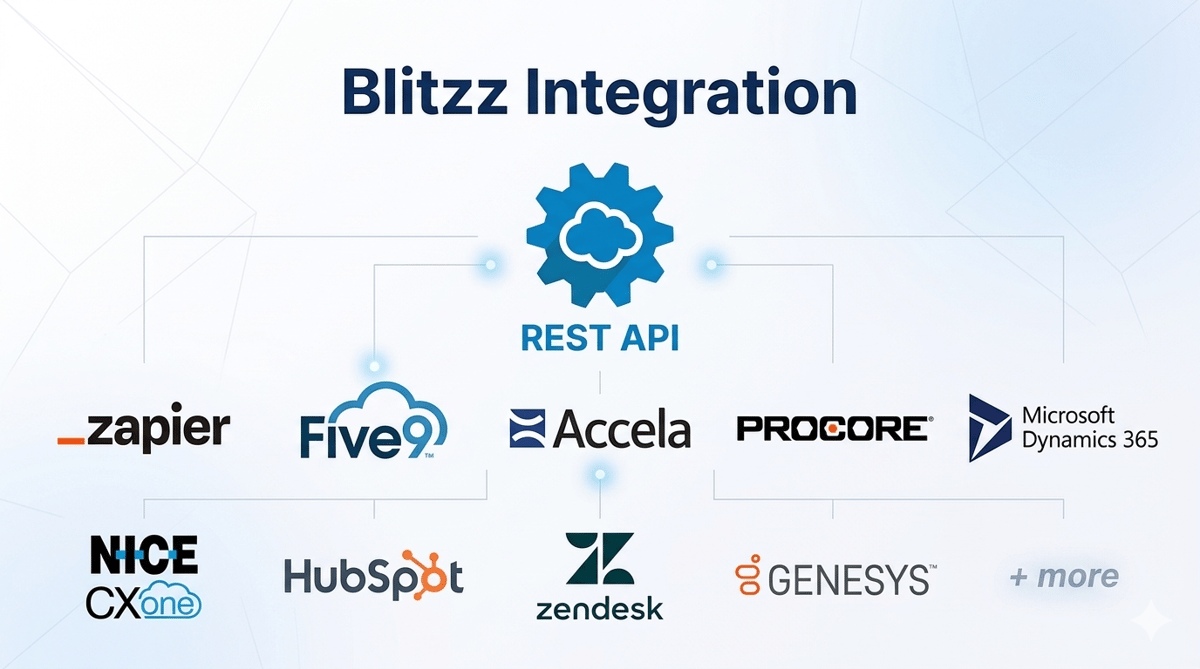
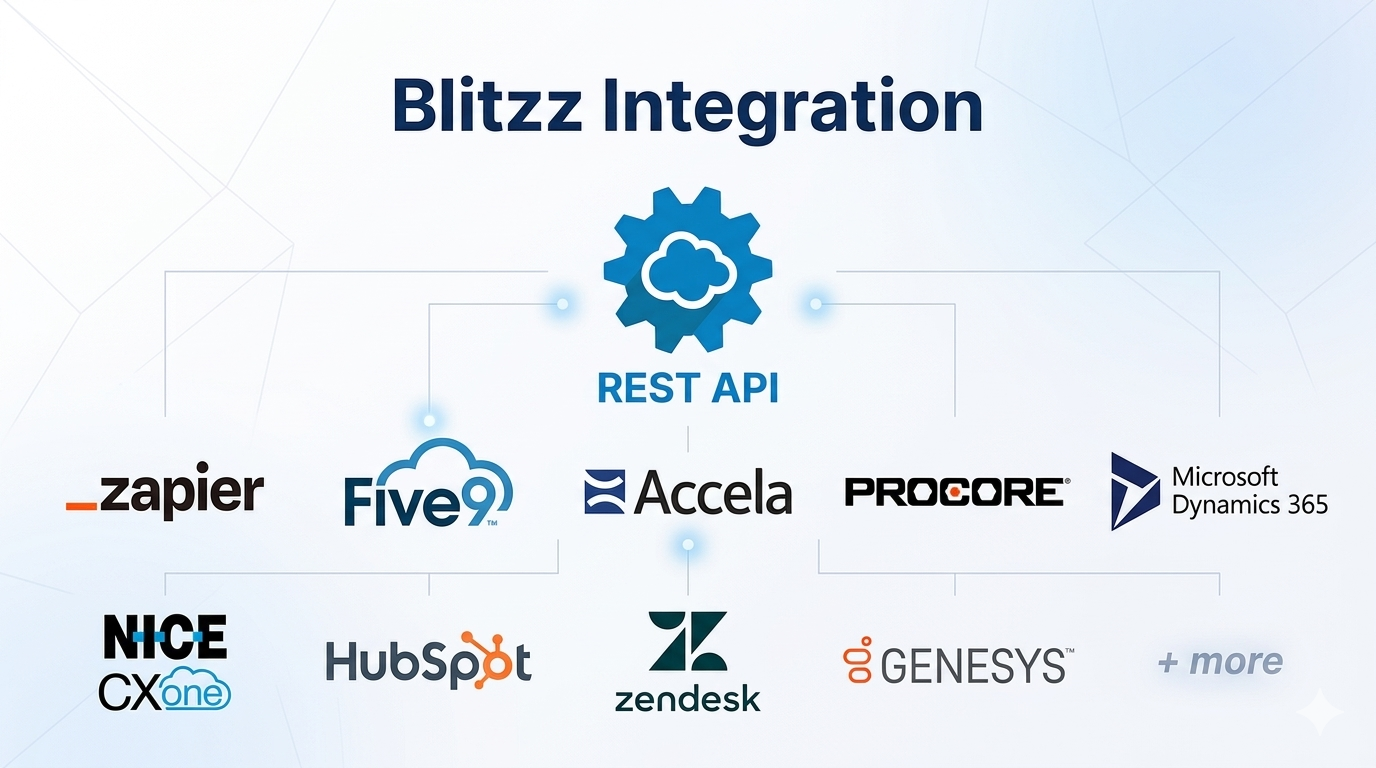
Whether your team runs on Salesforce, Zendesk, HubSpot, Microsoft Dynamics 365, Genesys, NICE, Five9, Procore, Accela, or a custom-built platform connected through Zapier or the REST API, Blitzz works where you work.
Explore the full Blitzz integration ecosystem →
Start a free 30-day trial at blitzz.co → — no app download required for your customers, no credit card to get started.

Blitzz Team
The Blitzz Team writes about remote video support, virtual inspections and field service. Our guides come from working with home builders, property managers, warranty teams, contact centers and field service organizations that use Blitzz to see and solve issues without a truck roll.
.jpg)