.png?width=120&height=55&name=Blitzz-Logo-right%20white%20eyes%20-%20not%20transparent%20(3).png)

.jpg?width=1200&height=675&name=Untitled%20(51).jpg)
On this page
.jpg?width=1648&height=954&name=Untitled%20(51).jpg)
Mold remediation takes place in spaces most homeowners have never seen and wouldn't know how to interpret if they did: crawl spaces, attics, wall cavities, and the inside of mechanical systems. The client pays for work they can't watch, to solve a problem they can't fully assess, often while worried about the health of their family. That is a lot of trust to ask for.
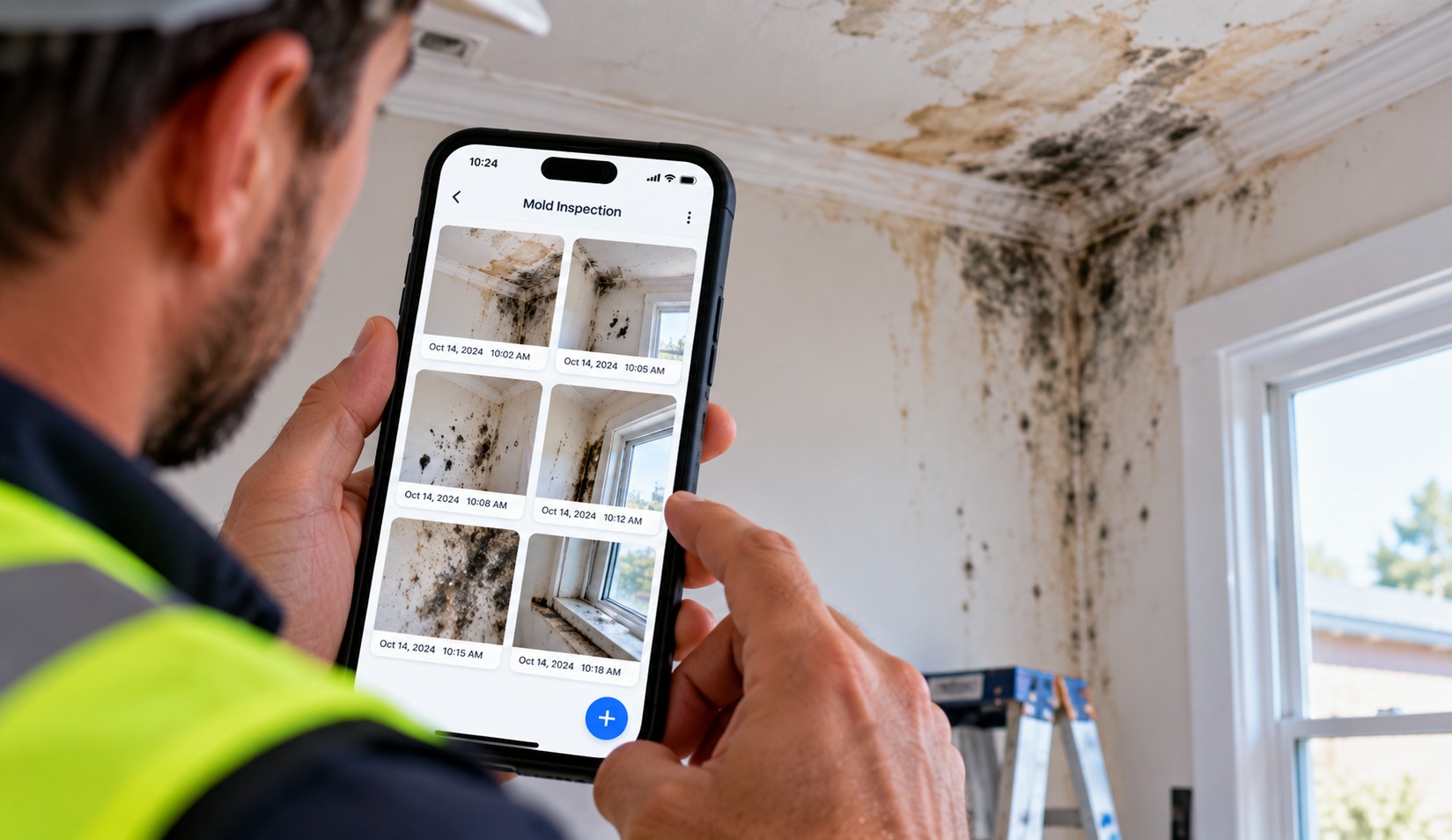
In this business, trust comes from documentation. A clear, dated record of what was found, what was done, and what the space looked like afterward is the closest thing a client gets to seeing the work themselves. It also protects your company when someone later questions whether the work was necessary, complete, or properly done.
This guide shows how mold remediation companies can use BlitzzCam, a field photo documentation platform from the team behind Blitzz remote video support, to capture that record consistently: from the first estimate through containment, remediation, and final walkthrough.
Working in spaces clients will never see
Most home services leave something visible behind. A new roof is on top of the house. A new water heater sits in the garage. Mold remediation is different. When the job is done well, the visible result is that nothing looks different, and the work itself happened behind walls, above ceilings, and under floors.
That creates a specific set of challenges:
- Clients can't judge the work. They rely entirely on what you tell them and show them.
- The problem is emotional. Mold often comes with health concerns, property damage, and sometimes an insurance claim. Clients want reassurance and clear answers.
- Scope can feel unclear. A client who hasn't seen the hidden damage may question why the estimate is what it is, or why the scope changed once demolition started.
- Disputes can surface months later. If mold or moisture returns, the first question is often whether the original work was done properly.
Photographic evidence answers all of these. A client who can see the colonized drywall, the containment setup, and the cleaned framing understands the job in a way no verbal explanation can match. For related work in the construction and property trades, the same principle holds: make the invisible visible, and trust follows.
The documentation problems mold remediation teams face
Most remediation companies take plenty of photos. The trouble is what happens to them afterward. A typical day might include several estimates across different properties, each with dozens of images from tight, awkward spaces. If those photos go into a personal camera roll, a handful of problems follow.
- Photos from different properties get mixed together. By evening, nobody is sure which crawl space belongs to which address.
- Details fade. By the time the estimate is written, the estimator can't remember which wall had the moisture reading or which attic corner had the heaviest growth.
- Sharing is clumsy. Sending photos through text threads or manually built links takes time and often means the client sees only part of the picture.
- Clients can't follow along. Once work begins, the homeowner has no view of what is happening in spaces they can't enter.
- The record isn't the company's. If photos live on a tech's phone, they leave when the tech does.
- Proof is thin. A photo with no verified date or location is easy to question in a dispute or claim.
None of this is a photography problem. It is an organization problem, and it grows with every new estimator and crew. Fixing it at the point of capture, rather than cleaning it up in the office, is what changes the outcome. The Blitzz case studies show how other field teams approach this across multiple sites.
How BlitzzCam works for mold remediation teams
BlitzzCam captures, verifies, organizes, and shares project photos. For a remediation company, that translates into a record that builds itself while the crew works.
- One project per property. Create a project for each address, and every photo files under it automatically. Six estimates in a day means six separate, clean records.
- GPS and timestamp on every photo. Each image is stamped when it is shot, so you can show when and where conditions were found, and when the work was done.
- Unlimited, high-resolution capture. There are no storage caps or per-image fees, which matters when a single project can produce hundreds of photos.
- Tags and phases. Custom tags such as "crawl space," "attic," "containment," "demo," "moisture," and "post-remediation" make photos easy to sort and find.
- Search by project, tag, and date. Pull up the exact photo you need in seconds, whether you are writing a scope or answering a client's question.
- Automatic sync. Captures sync as soon as the phone is back in range, which helps in crawl spaces, basements, and attics where signal drops.
- Checklists and task assignments. Crews complete checklists in the field with photos and structured answers, and managers can assign follow-up tasks.
- Branded PDF reports. A project's photos and checklists become a clean, professional report in seconds.
- Client portal. Share a project through a permission-based link. Clients see the records you choose and don't need to download an app.
- Company-owned cloud storage. The record stays with the business, whoever is on the crew.
See the full list on the BlitzzCam features page, and the thinking behind it on why Blitzz built it.
What to photograph at each stage
A consistent standard keeps the record complete across estimators and crews. Here is a practical framework for the life of a remediation job. Adapt it to your protocols and any standards or regulations that apply in your area.
1. The estimate and assessment
- Wide shots of each affected area for context, then close-ups of visible growth, staining, and water damage.
- Photos of the suspected source, such as leaks, condensation, or poor ventilation.
- Moisture readings, with the meter and the surface in the same frame where possible.
- Access points and conditions that affect scope, such as tight crawl spaces or blocked attics.
- The home's existing condition, including pre-existing damage, so you aren't blamed for it later.
2. Containment and setup
- Containment barriers, entry points, and negative air equipment in place before work begins.
- Floor and contents protection.
- Equipment placement, so the setup can be verified later.
3. Remediation work
- Affected materials before removal, during removal, and after.
- Exposed framing and substrates once materials are open, which also supports any change to the scope.
- Cleaning and treatment steps, from the same angle as the "before" shots.
4. Post-remediation and closeout
- Cleaned areas from the same positions used at the start, so before and after comparisons are obvious.
- Sampling locations, if testing is part of the job, so results can be tied to specific areas.
- Equipment removal, restored surfaces, and the final condition of the property.
A simple rhythm helps crews follow the standard: one wide shot, one medium shot, and one close-up at each step. Tag each photo with its stage so the office can search by phase later. The most important rule is to photograph concealed conditions before they are covered, because once a wall is closed, the evidence is gone.
.jpg?width=1648&height=954&name=Untitled%20(55).jpg)
Managing several estimates a day
Estimators carry the heaviest documentation load. A day with six or more estimates means six different properties, six sets of conditions, and six reports to write, often with a long drive between each one.
A few habits keep that manageable:
Create the project before you get out of the truck. When the estimator opens BlitzzCam and creates the project for the address first, every photo from that point files under the right property. There is nothing to sort at the end of the day.
Tag as you go. One quick tag on a key photo, such as "source," "heavy growth," or "moisture reading," saves a lot of scrolling when it is time to write the scope.
Search instead of remembering. When the estimator sits down to write findings, search by project and tag to see exactly what was captured. It replaces memory with a record, which makes estimates faster and more accurate.
Return visits are easier. When the estimator goes back to a property weeks later, the earlier photos are already under the same project, so it is simple to compare conditions over time.
Generate the report from the record. A branded PDF built from the project's photos and checklists gives the client a professional summary of findings without retyping.
The result is that estimates move faster, the documentation behind them is stronger, and nobody has to rebuild a day's work from memory at 8 p.m.
Sharing the record with clients
For an anxious homeowner, a phone call explaining what the crew found behind a wall is rarely enough. They want to see it. A shared link lets them.
BlitzzCam's client portal shares a project through a permission-based link. The client sees the photos and records you have chosen to grant, nothing more, and they don't need to download an app or create an account. Instead of a long call, you can say, "Here is the link to your home project," and let the photos do the explaining.
This helps in several ways:
- Fewer back-and-forth calls. Clients can answer many of their own questions by looking.
- Greater confidence. Seeing the containment, the removal, and the cleaned framing makes the work real.
- Clearer scope conversations. When the scope changes after demolition, the photos show exactly why.
- A professional impression. A clean, organized record signals a company that takes the work seriously.
A few words of caution apply. Mold work often involves sensitive situations, so think about what you share and with whom. Share only the records the client or their authorized representatives need, and avoid images that show personal items or identifying details. If data handling matters to your clients, point them to the Blitzz security overview. For property managers, landlords, and agents who coordinate on behalf of owners, the same approach supports real estate workflows.
Insurance claims and disputes
Mold frequently overlaps with water damage and insurance claims. Adjusters and carriers want evidence of the conditions found, the cause, the scope of work, and the result. Homeowners want to know the claim will be handled properly. In both cases, documentation is what moves the process forward.
With a time-stamped, location-verified record, you can respond quickly when an adjuster asks for supporting evidence. You share a permission-based link or send a branded PDF report built from the project's photos and checklists, instead of assembling images from different phones. Insurance teams rely on this kind of documented, dated evidence, and a company that can produce it quickly is easier to work with.
The same record protects you if a dispute arises later. If a client claims the work wasn't necessary, wasn't complete, or caused damage elsewhere, the project history shows the starting conditions, the containment, the work performed, and the final result. It won't settle every disagreement, and it is not a substitute for proper contracts, protocols, or legal advice, but it gives you facts instead of recollections.
One more point matters here. Because BlitzzCam keeps originals in company-owned, secure cloud storage with their verified details intact, you can share edited or cropped copies when needed without changing the evidence behind the job.
Supervising crews and winning more work
Fewer unnecessary site visits. When an owner or project manager runs several jobs at once, every drive to check on a crew is time not spent on estimates, calls, or the next job. With photos arriving in the project as work happens, managers can review live photos across active jobs, give feedback while the crew is still on site, and save trips for the times when something needs a physical presence. Checklists and task assignments turn what they see into action: a missed step becomes a task with an owner.
For jobs that need a second opinion from someone who can't be on site, take a look at Blitzz Inspect and the wider overview of remote inspections.
A stronger story for prospects. Documentation also works as a sales tool. When a prospective client is deciding whether to hire you, a clear record from a comparable past job shows exactly how you work: the thoroughness of the assessment, the care taken with containment, and the quality of the result. It is more persuasive than a brochure. Always get the previous client's permission before sharing, remove identifying details, and show only what is appropriate.
Social proof can come from customers too. The Blitzz video testimonials show how short, genuine customer voices can sit alongside project documentation to build credibility before a prospect ever picks up the phone.
Getting started
You don't need to change your whole operation to see the difference. Start small and build from there.
- Pick one estimator or crew. Run a two-week trial and compare it with your usual process.
- Create each property as a project first. Do it before the first photo, so everything files correctly.
- Set a short photo standard. Use the four stages above: assessment, containment, remediation, and closeout.
- Agree on six to ten tags. Keep them consistent across the team so search works.
- Share one project with a client. See how the link changes the questions you get.
- Review weekly. Look at a few jobs, recognize good documentation, and flag what is missing.
Once the habit takes hold, the record builds itself, and the company gets something that is hard to buy any other way: proof, in the client's own hands, that the work was done and done right. For more ideas on field documentation, browse the Blitzz blog, and see the integrations page for what connects to your existing tools.
BlitzzCam is currently in early access with a limited first cohort. Early members lock in launch pricing and help shape the roadmap. To see how it works or join the waitlist, visit the BlitzzCam page.

Blitzz Team
The Blitzz Team writes about remote video support, virtual inspections and field service. Our guides come from working with home builders, property managers, warranty teams, contact centers and field service organizations that use Blitzz to see and solve issues without a truck roll.
.jpg)
.jpg)