.png?width=120&height=55&name=Blitzz-Logo-right%20white%20eyes%20-%20not%20transparent%20(3).png)

On this page
Remote video inspections have fundamentally changed how inspectors, adjusters, engineers, and field teams operate. Companies that have made the switch are closing more jobs, slashing travel budgets, and delivering a better customer experience — all at the same time. But the results you get are only as good as the platform powering those inspections. Here's what to look for.
No-Download, Browser-Based Access for Instant Remote Video Inspections
The biggest friction point in any remote video inspection workflow is getting the other party connected. If your platform requires an app download, you've already lost. Customers in a claims situation, a homeowner in the middle of a pipe burst, or a technician on a factory floor — none of them have time to visit the App Store.
Why It Matters
A truly browser-based platform means the inspector sends a secure link via SMS, email, or WhatsApp, and the remote party joins instantly — no installs, no logins, no friction. This single feature is responsible for dramatically higher connection rates and faster time-to-resolution across every industry.
With Blitzz, inspectors achieve a 95% customer connection rate precisely because joining requires nothing more than a tap on a link. That's the standard any serious remote inspection platform should meet.
High-Definition Live Video Streaming — The Core of Remote Video Inspections
This one sounds obvious, but it's worth stating: remote video inspections only work when the video quality is high enough to make accurate assessments. Grainy, lagging, or pixelated video isn't just frustrating — it's a liability. Miss a hairline crack in a foundation or a damaged component on a production line, and you're creating downstream problems.
Your platform should deliver consistent HD video streaming even on modest mobile connections. Look for adaptive bitrate technology that maintains quality in variable network conditions. The ability to freeze a frame and zoom in for a closer look is equally important — your inspector shouldn't have to ask someone to hold perfectly still to examine a detail.
Blitzz Inspect™ provides high-definition video with freeze-and-zoom capability built in, ensuring that every remote video inspection session produces documentation-grade visual data.
AR Annotations and Real-Time Markup Tools
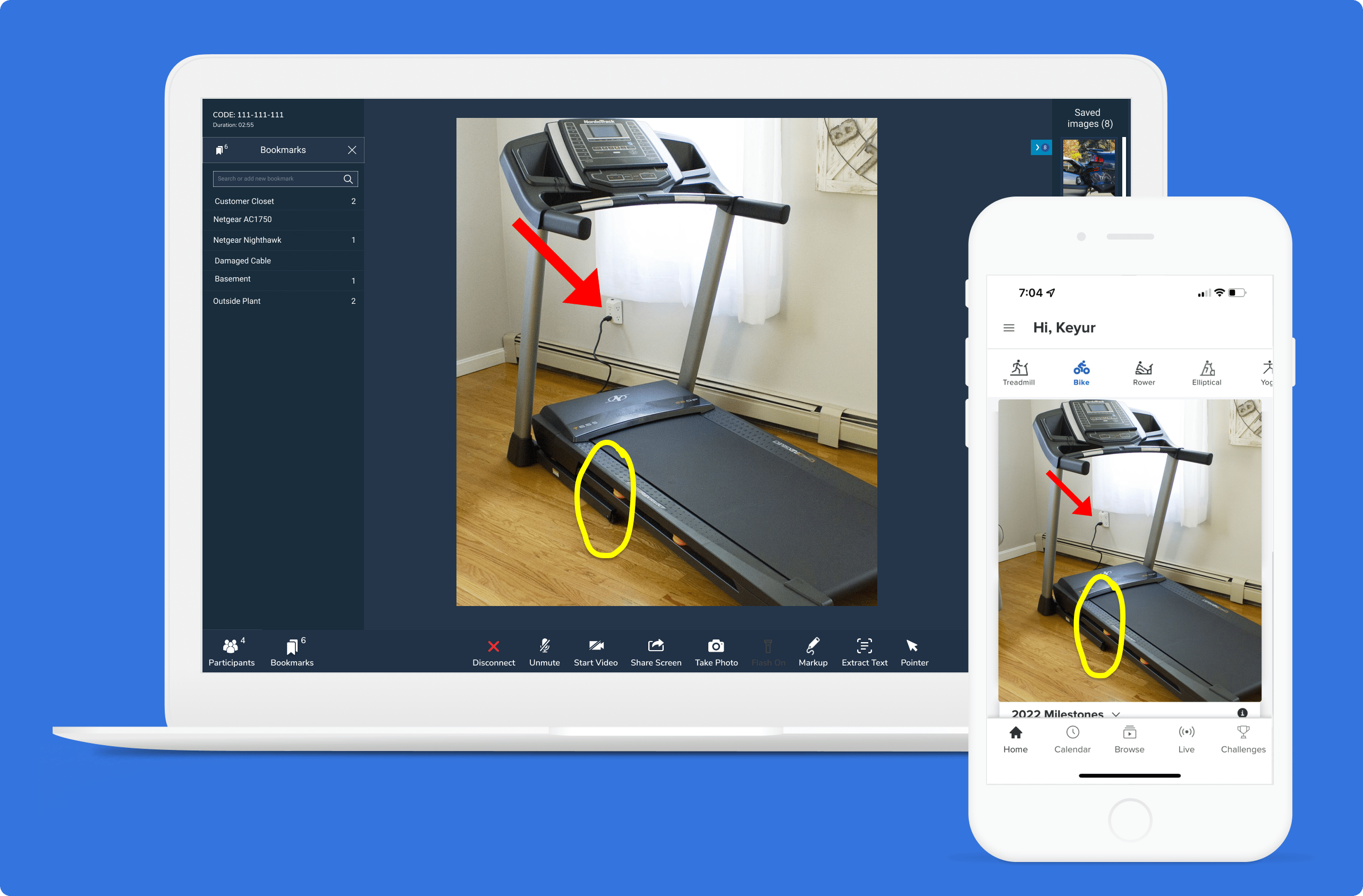
One of the most powerful advantages of modern remote video inspections over a basic video call is augmented reality. When an inspector can draw directly on the live video feed — circling a problem area, drawing an arrow to a specific component, or marking up a damage zone — the interaction becomes collaborative and precise in a way that words alone simply can't achieve.
Why Remote Video Inspections Need AR
AR annotations transform a passive viewing session into an active, guided inspection. The remote inspector can point out potential trouble areas on the live feed, and the on-site participant can use an interactive pointer to collaborate in return. This two-way visual communication closes the gap between remote and in-person quality.
Blitzz has incorporated AR markup tools as a core feature — not an add-on — because the company understands that seeing something and being able to interact with it are two very different things.
Pro Insight: Companies that use AR-enabled remote video inspections report significantly fewer re-inspection rates. When you can guide someone precisely to what you need to see, you get it right the first time — every time.
Timestamped Photo and Video Capture with Automatic Documentation
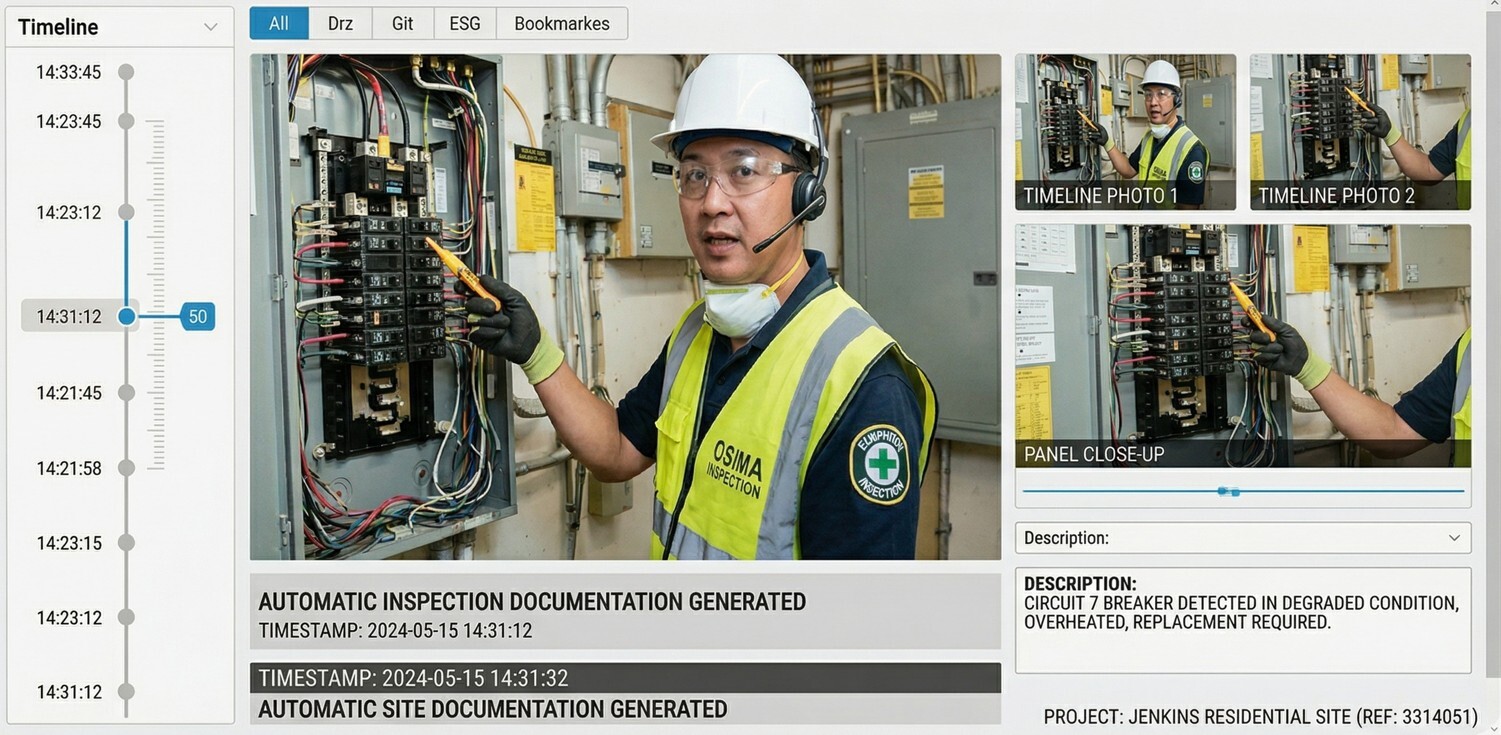
Inspections live and die by their documentation. Whether you're processing an insurance claim, conducting a building inspection, or performing quality control on a production line, the photos and videos captured during your remote video inspections need to be accurate, timestamped, and automatically organized.
Documentation That Actually Works
The platform should allow inspectors to capture high-resolution still images and short video clips directly within the inspection session, with automatic timestamp and geo-location data embedded. All media should be linked immediately to the inspection record — not saved in a random camera roll for someone to manually sort later.
With Blitzz, all documentation is automatically saved and linked to the session record, creating a complete visual audit trail that is dispute-resistant and compliance-ready. AI-powered insights also allow Blitzz to extract key data from captured images, auto-generating inspection reports without manual data entry.
- In-session photo capture
- Timestamped & geo-tagged
- Auto-linked to inspection record
- AI-powered report generation
Learn more about this feature with Blitzz Demo.
AI-Powered Insights and Optical Character Recognition (OCR)
The next generation of remote video inspections is not just about seeing — it's about understanding. AI capabilities embedded within the platform can dramatically accelerate the inspection process by automating data extraction, flagging anomalies, and generating structured reports from raw inspection footage.
OCR and Data Extraction
Optical Character Recognition (OCR) allows the platform to automatically read serial numbers, model numbers, meter readings, or license plates captured during the video session — eliminating the need for manual transcription and significantly reducing human error. This is especially powerful for utilities, insurance, and manufacturing remote video inspections where asset identification is critical.
Blitzz's AI capabilities capture images, extract data via OCR, and auto-generate inspection reports — turning a live video session into a fully structured, actionable record with minimal manual effort.
- AI-powered insights
- Optical Character Recognition
- Auto-generated inspection reports
Enterprise-Grade Security: Encryption, SOC-2 Compliance, and Audit Trails
Remote video inspections often involve sensitive data — property damage photos, proprietary equipment, personal customer information, regulated environments. The platform you choose must treat security as a foundational requirement, not an afterthought.
Security Checklist for Remote Video Inspections
At a minimum, your platform should offer end-to-end encryption for all video sessions and stored media. SOC-2 compliance demonstrates that the vendor has undergone independent verification of their security controls. Comprehensive audit trails — recording who accessed what, when, and what actions were taken — are essential for regulated industries including insurance, government, and healthcare.
Blitzz meets enterprise security requirements with end-to-end encryption, SOC-2 compliance, and comprehensive audit trails. Every remote inspection session is recorded with consent, securely stored, and accessible only to authorized personnel.
- End-to-end encryption
- SOC-2 compliant
- Full session audit trails
Security Note: If a platform can't clearly articulate its encryption standards and compliance certifications, that's a red flag. Any platform handling sensitive remote video inspections should be able to answer security questions without hesitation.
CRM and Workflow Integrations: Making Remote Video Inspections Part of Your Stack
Remote video inspections don't exist in a vacuum. They are one step in a larger workflow — whether that's a claims management process, a service ticket, a quality audit, or a customer support interaction. The platform you choose needs to integrate deeply with the tools your teams already use.
Integrations That Actually Matter
Look for native integrations with platforms like Salesforce, Zendesk, ServiceNow, and Genesys, plus REST API support for custom integrations. When session data, photos, and reports automatically sync to your CRM or claims system, you eliminate manual data entry, reduce the risk of records falling through the cracks, and create a seamless experience for your team.
Blitzz integrates with Salesforce, ServiceNow, Zendesk, Genesys, Zapier, and more — so your remote video inspection data flows directly into existing workflows without double-entry or compliance gaps.
- Salesforce
- ServiceNow
- Zendesk
- Genesys
- REST API
Geo-Location Tagging for Verified Remote Video Inspections
One of the most common concerns about remote video inspections — particularly in insurance, government, and real estate — is verification. How do you know the inspection is actually taking place at the claimed location? Geo-location data is the answer.
Location Verification in Practice
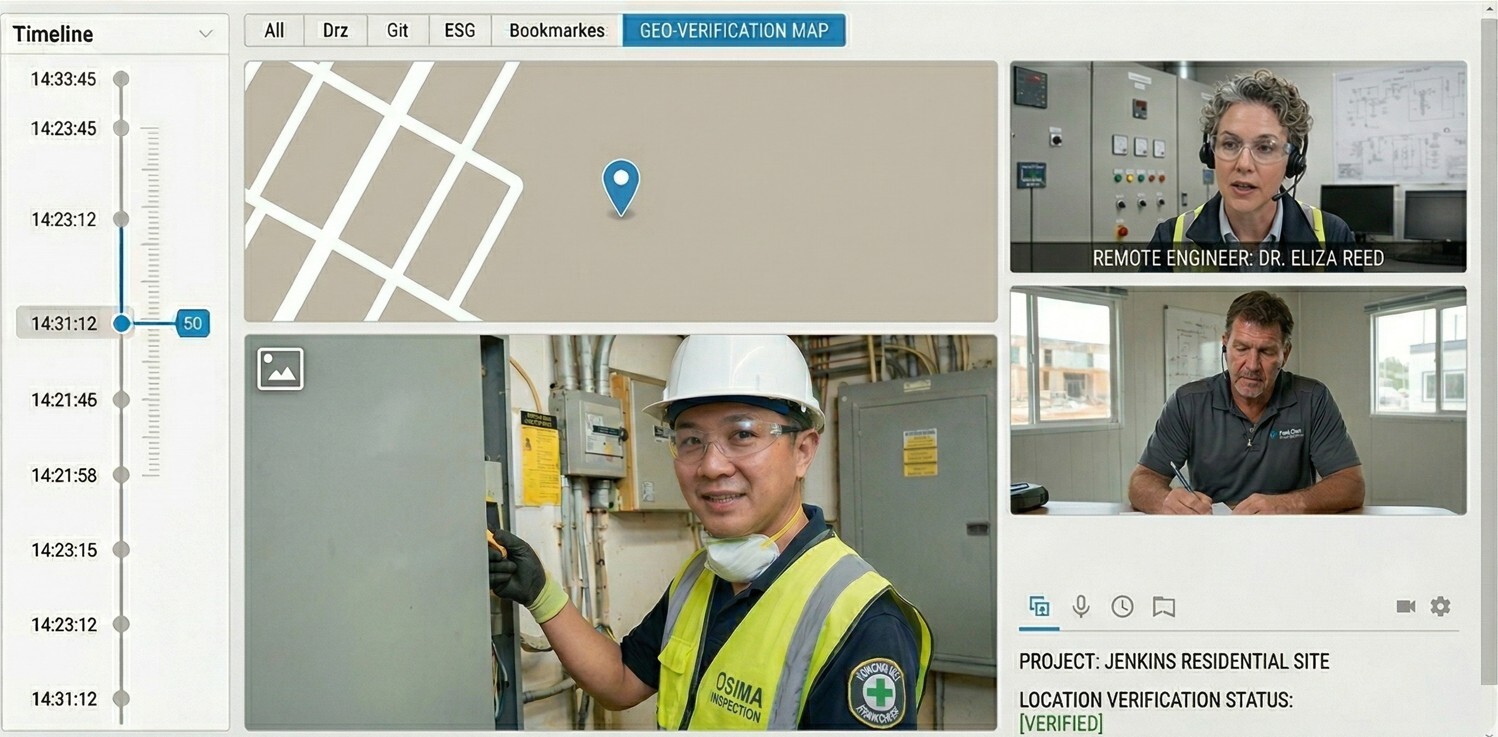
A platform with integrated geo-location tools automatically captures and embeds location data in every photo and session record. This creates a verifiable, tamper-evident record that proves the remote video inspection took place at the stated address and time. For claims processing, building inspections, and supplier audits, this is not a nice-to-have — it's a compliance requirement.
Blitzz includes geo-location as one of its data collection tools, alongside OCR and other accuracy-enhancing features, ensuring every remote video inspection produces documentation that stands up to scrutiny.
- Automatic geo-tagging
- Location-verified records
- Compliance-ready documentation
Multi-Participant Support and Expert Escalation
Not every remote video inspection can be handled by a single inspector. Complex situations — a large-scale insurance claim, a critical equipment failure, a structural assessment — may require input from multiple specialists simultaneously. The ability to add participants to a live session is a capability your platform must support.
Bringing in the Right Expertise, Remotely
Multi-participant support means an inspector can bring in a senior engineer, a claims supervisor, or a third-party specialist mid-session without ending the call and starting over. Screen sharing within the session adds another layer — participants can review documents, technical drawings, or schematics together in real time.
Blitzz allows inspectors to add participants during a live session and supports screen sharing of documents and drawings, enabling genuine expert collaboration during even the most complex remote video inspections.
- Multi-participant sessions
- In-session screen sharing
- Real-time expert escalation
Offline Mode and Cross-Platform Reliability for Remote Video Inspections in the Field
Real-world remote video inspections happen in places with spotty connectivity — rural properties, industrial facilities, basements, underground infrastructure. A platform that falls apart without a strong Wi-Fi signal isn't a field tool; it's a liability.
Built for Real Conditions
The best platforms provide offline or low-bandwidth modes that allow inspectors to continue capturing data even when connectivity is degraded, then sync automatically when the connection is restored. Cross-platform reliability — consistent performance across iOS, Android, and desktop — ensures that neither the inspector's device nor the customer's device creates a barrier to completing the inspection.
Blitzz Capture supports offline-mode functionality, recognizing that the value of remote video inspections is undermined the moment connectivity issues force teams back to in-person alternatives. The platform works seamlessly across devices so your inspectors can perform on any job site, anywhere.
- Offline / low-bandwidth mode
- Auto-sync on reconnection
- iOS, Android & desktop
The Bottom Line on Remote Video Inspections
Why these 10 features are the baseline — not the ceiling
Remote video inspections are no longer an emerging trend — they're the new standard for any organization that values efficiency, documentation quality, and customer experience. Companies doing 1,000 inspections a month save an average of 69 metric tons of CO₂ emissions per year. Inspectors reclaim the 20% of their time previously spent on the road. Claims are settled faster. Projects are approved without site visits. Quality control happens in real time.
But none of those outcomes happen with a mediocre platform. If the tool your team is using doesn't check all 10 boxes above — browser-based access, HD video, AR annotations, automated documentation, AI/OCR, enterprise security, deep integrations, geo-location, multi-participant support, and field reliability — then it's costing you more than you realize.
The good news: all 10 of these features exist in a single, purpose-built platform. Blitzz Inspect™ was designed from the ground up to make remote video inspections fast, reliable, and secure — without requiring app downloads, complex setups, or trade-offs in quality. If you've been turned off by remote video tools in the past, it's because they failed to deliver what you actually need. Blitzz is different. You can explore Blitzz pricing to see how it fits your agency’s budget and operational needs. Review available plans and features to find the right solution for scaling inspections efficiently and compliantly.

Blitzz Team
The Blitzz Team writes about remote video support, virtual inspections and field service. Our guides come from working with home builders, property managers, warranty teams, contact centers and field service organizations that use Blitzz to see and solve issues without a truck roll.
-2.jpg)