.png?width=120&height=55&name=Blitzz-Logo-right%20white%20eyes%20-%20not%20transparent%20(3).png)

On this page
Construction moves fast — but the tools meant to manage it often don't. Dispatching inspectors, chasing documentation, and switching between platforms slows down every phase of a project. That's the problem Blitzz + Procore is built to solve.
Procore is the project management backbone for thousands of construction teams worldwide. It's where your observations live, your punch lists are tracked, and your safety records are stored. But when something needs a visual check — a quality issue on a subcontractor's work, a progress milestone, a safety hazard flagged in the field — the standard answer has always been: send someone out there.
That's expensive. It's slow. And increasingly, it's unnecessary.
With the Blitzz + Procore integration, your project managers can launch a live video inspection directly from any Procore record, see the jobsite in real time through the field team's phone camera, annotate with AR markers, capture timestamped photos — and have all of it sync back to Procore automatically. No app downloads for the field. No context switching for the office. No unnecessary site visits.
The Real Cost of the Status Quo
Think about what a single unnecessary site visit actually costs. There's travel time, fuel, scheduling coordination, and the project delay while everyone waits for the inspector to arrive. Multiply that by dozens of punch list closures, QA checks, and progress verifications across a multi-site project, and you're looking at a serious drag on margins and timelines.
The bigger problem is documentation lag. When an inspector finally does make it out, notes get taken on a clipboard or a phone, photos live in someone's camera roll, and syncing all of it back into Procore is a manual step that almost always happens too late — if it happens at all. Projects get delayed waiting for records that should already exist.
What the Blitzz + Procore Integration Actually Does
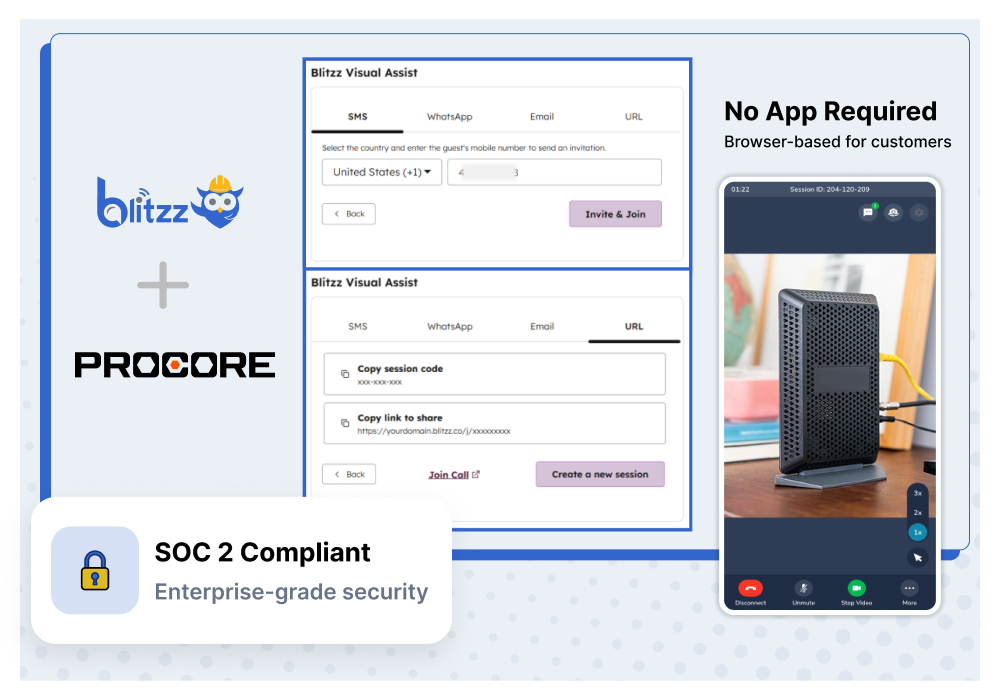
The integration is native — it lives inside Procore, not alongside it. Here's what that means in practice:
One-click session launch
Start a remote video inspection directly from any Procore project, observation, inspection, or punch list record. No tab switching, no copy-pasting links.
Automatic data sync
Photos, recordings, AR annotations, GPS data, and AI-generated session summaries all sync back to the relevant Procore record the moment the session ends.
No app for field teams
Subcontractors and field workers tap a link sent via SMS, email, or WhatsApp. They're connected instantly from any smartphone browser — no install required.
Enterprise-grade security
SOC 2 compliant with end-to-end encryption and SSO/SAML support. Your project data stays protected at every step of the inspection workflow.
Where Construction Teams Are Using It
The integration slots into the moments where your team currently loses the most time. Here's where Blitzz is making the biggest difference for construction projects:
Remote QA/QC inspections
Walk subcontractors through visual checklists across multiple job sites without dispatching a single inspector. Capture timestamped photos and document findings directly in Procore.
Progress verification
Verify construction milestones with live video walkthroughs. Compare completed work against project plans, capture evidence, and update Procore project status — all in one session.
Safety observations
Identify and document hazards in real time. Log observations to Procore's Safety tool with photo evidence, GPS data, and AR annotations for precise, defensible documentation.
Punch list close-out
Walk subcontractors through remaining items on video, confirm completion visually, and update Procore records — without scheduling an additional site visit.
Remote expert assistance
Connect field teams with off-site engineers and specialists for real-time guidance on complex installations. Reduce rework and costly delays before they compound.
Up and Running the Same Day
One of the common hesitations with new integrations is the setup overhead. With Blitzz + Procore, that concern disappears fast. Here's how straightforward it is:
Install from the Procore App Marketplace
Find Blitzz in the Procore App Marketplace, install it, and configure with your Blitzz API key. Set up project mappings and add the Blitzz widget to your project layouts. Most teams are live the same day.
Launch a remote inspection from any record
From any Procore project, observation, inspection, or punch list, click to start a Blitzz session. Send a secure link to the field via SMS, email, or WhatsApp — it takes seconds.
Inspect, document, and sync — automatically
See through the field team's camera in real time. Zoom in, draw AR annotations, capture HD photos, and complete the inspection. All documentation syncs back to Procore with no manual upload required.
Built for How Construction Actually Works
Construction projects don't happen in a single office. They span multiple job sites, dozens of subcontractors, and a constant flow of field-to-office communication that has to happen fast or things fall behind. The tools that support that work need to be just as flexible.
That's why Blitzz is completely browser-based for field teams. No asking a subcontractor to download an app they'll never use again. No waiting for app store approvals on a managed device. They get a link, they tap it, they're connected. The 95%+ connection success rate isn't a feature — it's what happens when you remove every unnecessary step between the problem and the person who can solve it.
For the project managers and inspectors on the office side, the experience is just as seamless. Everything happens inside Procore. There's no parallel system to manage, no manual export of photos, no rebuilding session notes from memory at the end of the day. The integration handles the documentation so your team can focus on the project.
Currently in beta — the Blitzz + Procore integration is available for early access users today. Core functionality is fully operational, and beta users get priority support and direct access to the Blitzz product team. Early access pricing is available for teams who join during this phase.
The Bottom Line
Every unnecessary site visit is time your team isn't spending on the work that actually moves a project forward. Every documentation gap is a risk that compounds over the life of a project. And every tool that requires your field teams to jump through hoops is a tool that doesn't get used consistently.
Blitzz + Procore closes those gaps. It gives construction teams the ability to inspect remotely, document automatically, and keep everything exactly where Procore already manages it — without changing how anyone on the team works.
If you're already running projects in Procore, adding Blitzz is the fastest way to eliminate the inspection bottlenecks that are slowing you down.
Frequently Asked Questions
Will Blitzz disrupt the way my team currently uses Procore?
Not at all. Blitzz lives inside your existing Procore workflow — your team doesn't learn a new system or change how they manage projects. Project managers launch inspections from the same records they already work in, and everything lands back in Procore automatically. The only thing that changes is how often you need to send someone to the site.
What happens to session footage and photos after an inspection?
Everything captured during a Blitzz session — HD photos, video recordings, AR annotations, GPS location data, and AI-generated summaries — syncs directly to the relevant Procore record the moment the session ends. Nothing sits in someone's camera roll waiting to be uploaded.
Can Blitzz handle inspections across multiple active job sites at once? Y
es. Because Blitzz is browser-based and tied to individual Procore project records, your team can run concurrent sessions across different sites without any conflict. Each session's data stays scoped to its own project record.
What if the field worker has a poor internet connection on site?
Blitzz is optimized for real-world jobsite conditions, including low-bandwidth environments. The platform maintains connection quality even in areas with limited signal, and captured photos and session data sync once connectivity is restored.
How does Blitzz handle situations where a subcontractor isn't tech-savvy?
The field experience is intentionally as simple as possible — one tap on a link, and they're connected. There's no account creation, no login, no app to figure out. If they can open a text message and tap a link, they can use Blitzz.
Does Blitzz work for pre-construction walkthroughs, or only active builds?
It works across every phase. Teams use it for pre-construction site assessments, active build inspections, progress verification, and final punch list close-out. Any stage where eyes on the site would move things forward is a stage where Blitzz adds value.
How does remote inspection hold up for compliance and legal documentation purposes?
Every Blitzz session produces timestamped, GPS-tagged photo and video evidence that syncs directly into Procore. That creates a defensible, time-stamped audit trail — often more thorough than what a manual in-person inspection produces.
What's the difference between using Blitzz and just doing a regular video call?
A standard video call gives you a live view but nothing else. Blitzz adds AR annotation tools so you can mark up what you're seeing in real time, HD photo capture with automatic sync, session recording, AI-generated summaries, and direct integration with Procore records. The output is structured documentation, not just a call that happened.
Related Reading:
- Blitzz Integrations: Connect to Your Existing VRA Workflow
- Blitzz + Salesforce VRA: Transforming Customer Support with Live Visual Assistance
- The Future of Co-Browsing: AI, AR and What's Next
- 10 Best Remote Visual Support Software in 2026

Blitzz Team
The Blitzz Team writes about remote video support, virtual inspections and field service. Our guides come from working with home builders, property managers, warranty teams, contact centers and field service organizations that use Blitzz to see and solve issues without a truck roll.