.png?width=120&height=55&name=Blitzz-Logo-right%20white%20eyes%20-%20not%20transparent%20(3).png)


On this page
Why Enterprise Visual Assistance Tools Are Replacing Truck Rolls in 2026

Enterprise visual assistance tools are software platforms that let remote experts see exactly what a field technician or customer sees — through their phone camera — and guide them to a fix using live video, augmented reality (AR) annotations, and AI automation, without anyone needing to travel to the site.
If you're evaluating options, a leading solution like Blitzz Concierge offers an app-free, AR-powered, and CRM-native platform designed specifically for telecom, utilities, and BPO environments.
Here's the problem most field service managers know too well.
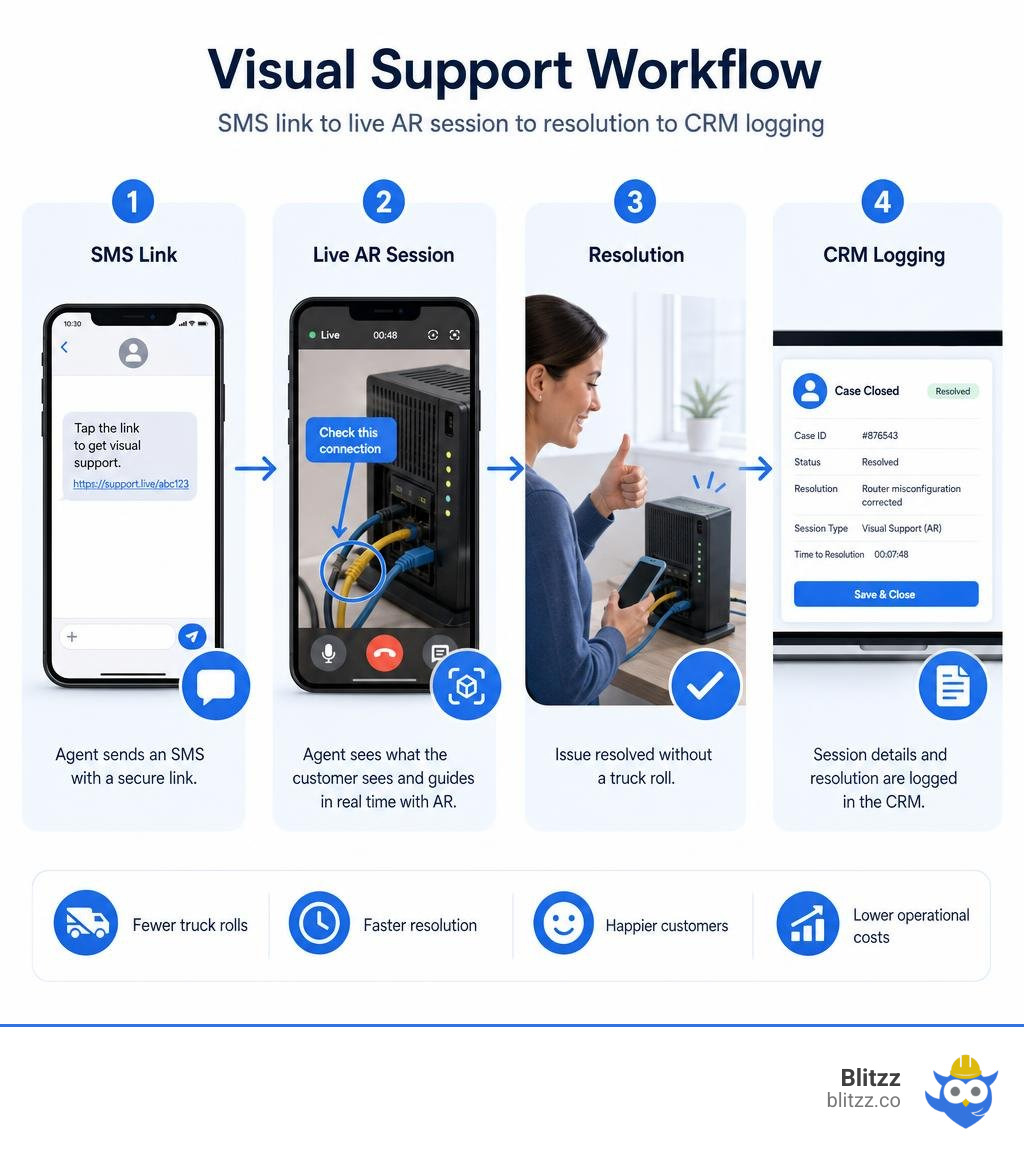
A customer calls in. Your agent can't see the issue. They guess. They send a truck. The tech arrives, finds it's a simple router misconfiguration, fixes it in four minutes, and drives back. That truck roll just cost you $200 to $500 — and your customer lost half a day.
Multiply that by thousands of calls a month, and the math gets painful fast.
Enterprise visual assistance tools exist to break that cycle. Instead of dispatching a technician, your agent sends a link via SMS. The customer taps it — no app download required — and your agent can immediately see what the customer sees. They draw an arrow on the live video. The customer turns the right cable. Problem solved.
The results are measurable. Platforms in this category have documented outcomes including a 40%+ reduction in operational costs, 30% higher customer satisfaction scores, and significant drops in unnecessary truck rolls across telecom, utilities, insurance, and manufacturing deployments.
The global intelligent virtual assistant market is on track to reach $25.7 billion in 2026, and visual assistance is one of the fastest-growing segments within it — driven by AI, AR, and the simple fact that showing is faster than telling.
But not all tools are built the same. Consumer video apps don't cut it at enterprise scale. They lack security controls, audit trails, CRM integrations, and the multi-tenant architecture that large operations need.
This guide breaks down what separates enterprise-grade tools from the rest, and what to look for when choosing one.
Key enterprise visual assistance tools vocabulary:
- Visual Remote Assistance (VRA) for Salesforce
- augmented reality remote assistance
- visual remote assistance
Core Capabilities of Enterprise Visual Assistance Tools
When evaluating software, it is easy to get distracted by flashy user interfaces. However, true enterprise-grade tools are distinguished by their back-end robustness, system interoperability, and capability to function reliably under real-world operational constraints.
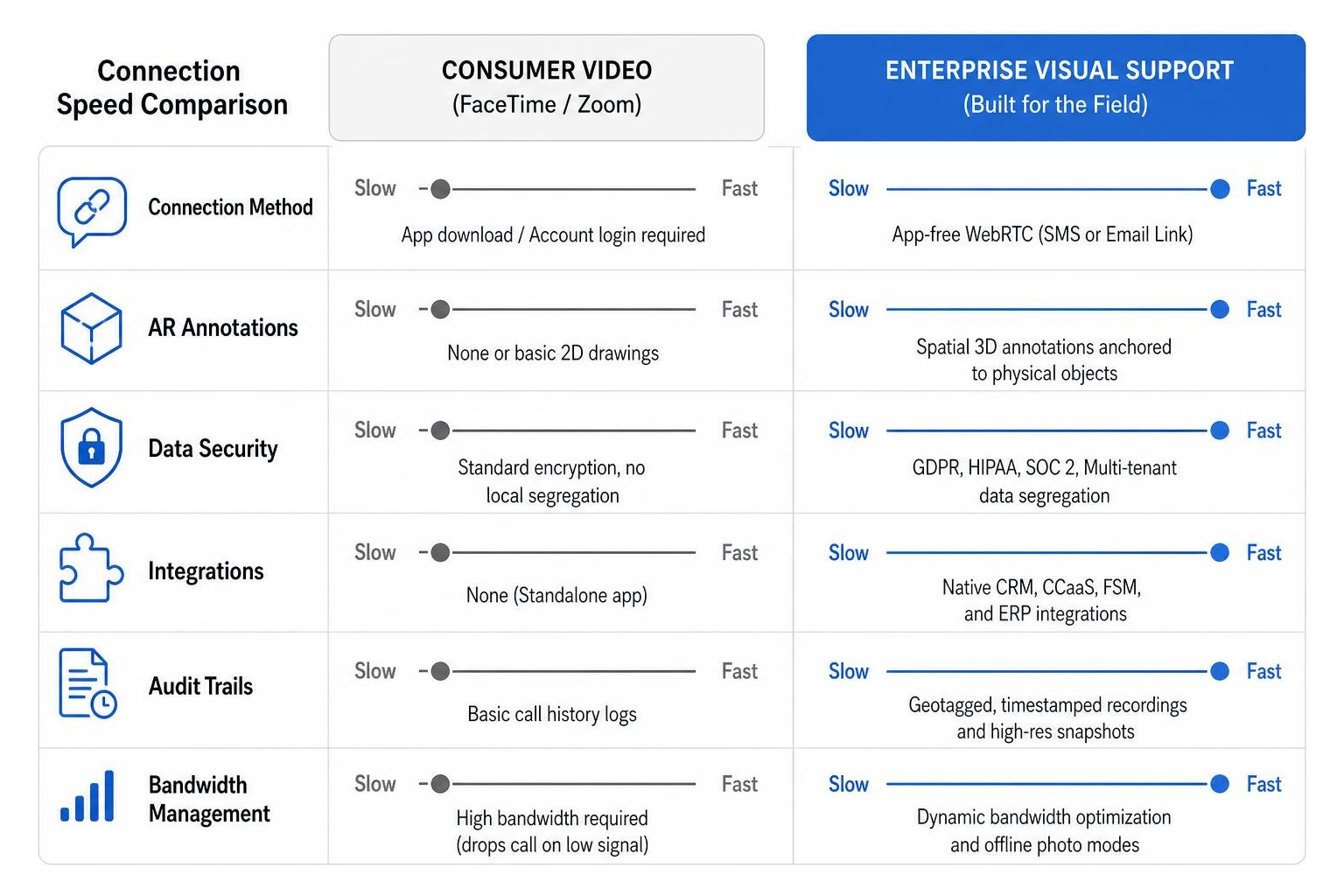
Unlike standard video conferencing platforms built for virtual boardrooms, industrial-grade visual support platforms are built for the field. They must turn a shaky, poorly lit smartphone feed into a high-precision diagnostic environment.
| Feature | Consumer Video | Enterprise Visual Assistance |
|---|---|---|
| Connection Method | App download / Account login required | App-free WebRTC (SMS or Email Link) |
| AR Annotations | None or basic 2D screen drawings | Spatial 3D annotations anchored to physical objects |
| Data Security | Standard encryption, no local segregation | GDPR, HIPAA, SOC 2, Multi-tenant data segregation |
| Integrations | None (Standalone app) | Native CRM, CCaaS, FSM, and ERP integrations |
| Audit Trails | Basic call history logs | Geotagged, timestamped recordings and high-res snapshots |
| Bandwidth Management | High bandwidth required (drops call on low signal) | Dynamic bandwidth optimization and offline photo modes |
To understand how these platforms transform operations, we must look at the complete lifecycle of a remote visual session. For a deep dive into the foundational mechanics of this technology, explore our Remote Visual Support: The Complete Guide to Seeing What Your Customer Sees.
App-Free Customer Access and Multi-Channel Support
The absolute biggest point of failure in remote support is session initiation. If a customer has to navigate to an app store, remember their password, download a 100MB application, and accept five permission prompts, they will abandon the session.
Enterprise-grade tools utilize WebRTC (Web Real-Time Communication) to establish secure, high-definition video connections directly inside the native mobile browser. The agent triggers an SMS or email containing a unique link. The customer taps it, grants one-time camera access, and is instantly connected.
Beyond live video, a comprehensive Enterprise Remote Collaboration Suite must support diverse interaction channels within the same interface:
- Co-browsing: Allowing agents to securely navigate web portals or apps alongside the customer without viewing sensitive personal data.
- Mobile Screen Sharing: Enabling customers to share their mobile UI to troubleshoot app configurations or software settings.
- Asynchronous Image Capture: Letting users take high-resolution photos of serial numbers or damage and submit them for review when a live call isn't necessary.
These multi-channel capabilities ensure that no matter the customer's tech-savviness, agents can find a frictionless path to resolution. If you want to compare how different platforms stack up on these metrics, check out our breakdown of the Best Remote Support Tools.
AR and Merged Reality in Enterprise Visual Assistance Tools
Standard video calls suffer from "verbal misalignment." An agent says, "unplug the blue cable," and the customer unplugged the green one because of poor lighting.
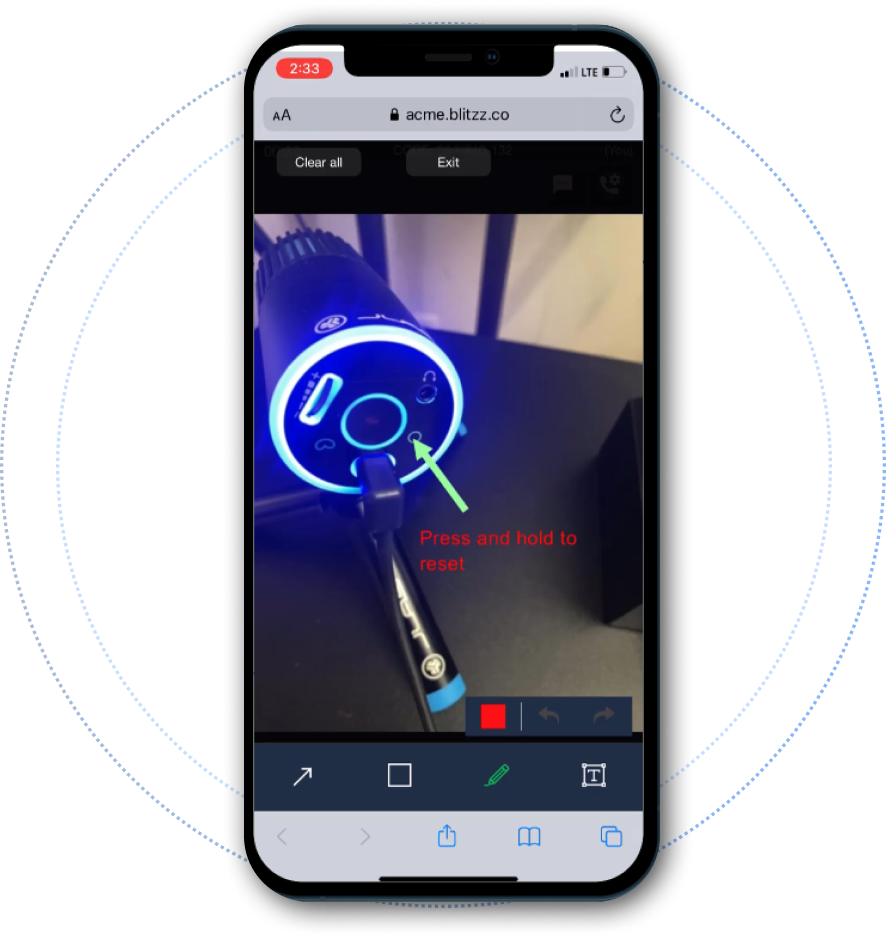
Augmented reality (AR) solves this by anchoring digital annotations (arrows, circles, text) to real-world objects. If the customer moves their phone camera, the arrow stays pinned to the exact port or screw where the agent placed it. This spatial computing capability prevents costly errors and ensures safety compliance.
In complex industrial and manufacturing environments, merged reality takes this a step further. Instead of just drawing a 2D arrow on a screen, merged reality overlays a live video feed of the expert’s hands or tools directly over the technician's view.
The expert can physically demonstrate how to turn a valve, align a bracket, or use a multimeter in real-time. Statistics show that experts using merged reality are up to 11.7X faster than alternative remote support methods, driving a 20% improvement across all customer care episodes. For more on how these spatial tools empower frontline teams, read How Augmented Reality Helps Field Service Workers.
Security, Compliance, and Multi-Tenant Architecture
For global enterprises and Business Process Outsourcing (BPO) providers, security is not a checkbox—it is a operational gatekeeper. Handling live video feeds from inside customer homes, medical facilities, or secure server rooms requires strict adherence to international data privacy regulations.
Any enterprise platform must offer:
- Multi-Tenant Data Segregation: For BPOs running campaigns for competing clients, data must be completely ring-fenced. Agents on a telecom campaign must have zero visibility into the visual data or session history of an insurance campaign.
- Regulatory Compliance: Full compliance with GDPR, HIPAA, and ISO 27001 standards, ensuring that Personally Identifiable Information (PII) is protected.
- End-to-End Encryption: All video, audio, and chat data must be encrypted in transit using 256-bit AES protocols.
Identity Management and SSO for High-Turnover Teams
BPOs and large customer service centers are notorious for high agent turnover. Managing user credentials manually is an IT security nightmare.
Enterprise visual assistance tools must integrate with corporate identity providers via SAML 2.0 and OIDC Single Sign-On (SSO). Furthermore, support for SCIM (System for Cross-domain Identity Management) is essential for automated user provisioning and deprovisioning.
When an agent is offboarded from the central HR system, their access to the visual support platform must be automatically revoked within minutes, eliminating the risk of orphaned accounts.
Documentation, Audit Trails, and Session Recording
In regulated sectors like insurance, healthcare, and utilities, a visual session is more than a support call—it is legal evidence. Platforms must provide structured, exportable session documentation that can be stored securely within the enterprise's system of record.
This includes:
- Geotagged and Timestamped Evidence: Capturing high-resolution photos with embedded GPS coordinates and precise timestamps to prevent fraud in insurance claims.
- Session Recording Controls: The ability to record entire video calls, with granular controls to pause recording when sensitive information (like credit cards or private documents) is visible.
- Comprehensive Audit Logs: Tracking every action taken during a session—who initiated the call, when annotations were drawn, and who downloaded the session summaries.
To understand how these compliance features protect your brand, review the Top Features to Look for in Remote Inspection Technology.
AI-Powered Automation and Workflow Integrations
AI has shifted from a futuristic buzzword to a core driver of contact center efficiency. In enterprise visual assistance tools, AI acts as a digital co-pilot that works alongside the agent in real-time to speed up resolutions and eliminate manual administrative work.
Intelligent Knowledge Retrieval and AI Copilots
Frontline technicians waste an average of 3 to 5 hours per week searching through scattered manuals, SOPs, and legacy databases. Modern AI copilots solve this by utilizing Retrieval-Augmented Generation (RAG) to instantly extract answers from complex documentation.
During a live session, the AI can:
- Analyze Video and Images: Automatically identify equipment models, serial numbers, and error codes using computer vision.
- Generate Real-Time Procedures: Convert text-based PDF manuals into step-by-step visual checklists overlaid on the agent's screen.
- Provide Source-Cited Answers: Deliver precise troubleshooting steps to the agent with exact page citations and video timestamps, eliminating "AI hallucinations" and building technician trust.
This combination of video intelligence and automated knowledge retrieval can reduce documentation search times by up to 60% and boost first-time fix rates by 70%. To compare how video, AR, and AI work together, see Remote Support Tools Compared: When to Use Video, AR, and AI.
CRM, CCaaS, and Ticketing System Integrations
An enterprise tool that operates in a silo is a tool that agents won't use. If an agent has to copy-paste session links, manually upload photos, and type up call summaries in a separate window, it creates "system-switching overhead" that slows down average handle times (AHT).
Deep integrations with platforms like Salesforce, Zendesk, Genesys, and ServiceNow are critical. Agents should be able to launch a visual session with a single click from within their active ticket.
Once the session ends, the platform must automatically sync the call recording, high-resolution snapshots, chat transcripts, and AI-generated summaries directly back to the CRM case file.
Evaluating Scalability, Accessibility, and Total Cost of Ownership
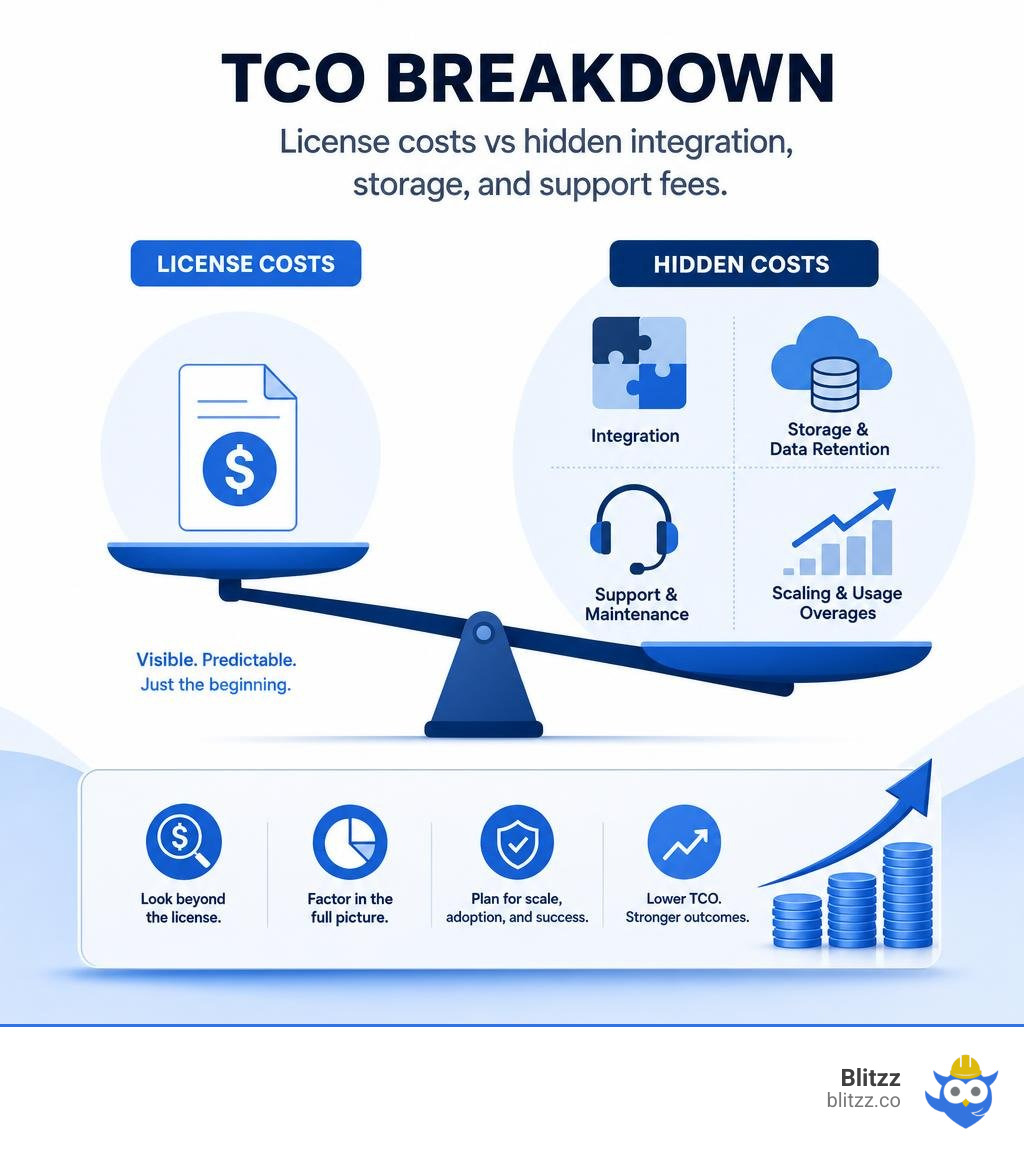
When selecting an enterprise visual platform, procurement teams must look past the initial licensing fee and calculate the true Total Cost of Ownership (TCO).
SMB Ease-of-Use vs. Enterprise Visual Assistance Tools
Many tools on the market are designed for SMBs—they are easy to set up with a credit card but fail when scaled to thousands of concurrent users.
Enterprise platforms must be architected for high concurrency, global low-latency video routing, and complex organizational hierarchies. This is where "success engineering" comes in.
Sustained enterprise adoption requires strategic consulting, customized agent training, and workflow re-engineering. Without this structured approach to change management, software deployments often suffer from low internal adoption. Discover how to navigate these enterprise-level challenges in our guide on Remote Visual Assistance Tools.
Digital Accessibility and Screen Reader Compatibility
True enterprise software must be inclusive. It must comply with global accessibility standards, including WCAG 2.1 Level AA and Section 508 requirements. This ensures that employees with visual, auditory, or motor impairments can navigate the software productively.
Platforms must integrate seamlessly with industry-standard screen readers like JAWS (Job Access With Speech) and support operating system accessibility features such as voice access, high-contrast modes, and keyboard-only navigation.
By prioritizing accessibility, enterprises not only maintain regulatory compliance but also foster a more diverse and capable workforce.
Frequently Asked Questions about Enterprise Visual Support
What is the difference between standard video calls and enterprise visual assistance?
Standard video calls (like standard consumer video apps) only transmit raw video. Enterprise visual assistance tools provide interactive AR annotations that anchor to physical objects, dynamic bandwidth optimization for field environments, automated session documentation, enterprise security (SSO/SCIM), and native integrations with CRMs to log visual evidence automatically.
Can enterprise visual assistance tools work in low-bandwidth or offline environments?
Yes. Enterprise-grade tools are designed to optimize video quality dynamically based on network strength. In areas with extremely poor connectivity, platforms can switch to an offline "photo mode," allowing users to capture high-resolution, geotagged images that are queued and automatically uploaded once a connection is restored.
How do enterprise visual assistance tools integrate with existing helpdesk workflows?
They integrate natively via open APIs and mobile SDKs. This allows agents to initiate secure visual sessions directly from their existing CRM or ticketing interface (such as Salesforce or Zendesk) with a single click. All session data, including recordings, images, and AI transcriptions, is automatically written back to the customer's case history.
Conclusion
In 2026, relying on verbal descriptions or expensive truck rolls to solve physical equipment problems is no longer a viable operational strategy. Enterprise visual assistance tools have proven that they can deliver immediate, measurable ROI by cutting truck rolls, increasing first-contact resolution rates, and elevating customer satisfaction.
At Blitzz, we specialize in helping enterprises bridge the gap between back-office expertise and frontline reality. Our app-free, browser-based video support platform integrates seamlessly into your existing CRM and CCaaS workflows, ensuring rapid adoption and maximum security.
Ready to see how visual support can transform your operations? Check out our Visual Remote Assistance Guide 2026 or Transform your contact center with Blitzz today.

Blitzz Team
The Blitzz Team writes about remote video support, virtual inspections and field service. Our guides come from working with home builders, property managers, warranty teams, contact centers and field service organizations that use Blitzz to see and solve issues without a truck roll.